

Timetable‑Student Version
shouhui qi · Utilities
Independent analytics for this App Store listing. AppTracker is not affiliated with shouhui qi.
Chart standing · US
What changed · US
Listing changes AppTracker has observed for this app in this storefront — new versions, price moves, rating shifts, and store copy.
Four useful additions · Lock Screen widgets See your timetable without unlocking. Two rectangular widgets sit under the time: one shows which period it is, the other shows today's classes. No permission needed. To add them: touch and hold the Lock Screen → Customise → tap the box below the time → find this app. · Dynamic Island and Live Activity Ten minutes before class, a Live Activity appears with the class name and a countdown to the end. It disappears when the class ends. Turn it off in Me → Class reminders. · Write to Yourself Write something of your own, pick a time each day, and it pops up as a notification. · Help A help button now sits at the top right of the Me tab — in a few lines it explains what the app can do. Everything is offline.
Screenshots


About
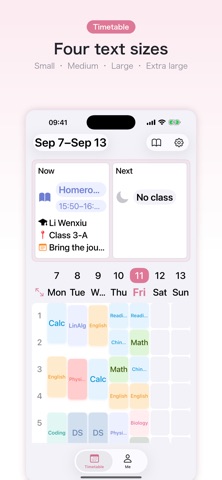
More small additions: See today at a glance Open the app and today is right there: the top cards show the current class and the next one, with time, teacher, room and notes. Two-week timetables This week and next week each have their own timetable, edited independently. Turn it on and a "This week / Next week" pill appears next to the dates — tap to switch. Anything you copy from this week can be pasted into next week. Adjust class times on the fly Drag the labels on the timesheet to change when classes start, how long they last, and how long the breaks are. Build the week your way · Long-press any cell: copy, cut, paste, delete · Gear menu: class times, periods per day, font size, merge classes, odd/even weeks, short week, clear timetable · Merge classes: consecutive periods of the same class show as one block · Short week: Monday to Friday only, with wider cells that are easier to tap Built to be readable Four text sizes — Small, Medium, Large, Extra large. In landscape the rows compress automatically so more of the day fits on screen. Two themes Blue or pink, switch whenever you like. Your data stays on your device No sign-in, no network requests, no uploads. Your timetable is stored only on your own iPhone or iPad. Terms of Use (EULA):https://www.apple.com/legal/internet-services/itunes/dev/stdeula/ Privacy Policy:https://www.iphonesir.com/privacy.php
What's new · 3.0.4
Four useful additions · Lock Screen widgets See your timetable without unlocking. Two rectangular widgets sit under the time: one shows which period it is, the other shows today's classes. No permission needed. To add them: touch and hold the Lock Screen → Customise → tap the box below the time → find this app. · Dynamic Island and Live Activity Ten minutes before class, a Live Activity appears with the class name and a countdown to the end. It disappears when the class ends. Turn it off in Me → Class reminders. · Write to Yourself Write something of your own, pick a time each day, and it pops up as a notification. · Help A help button now sits at the top right of the Me tab — in a few lines it explains what the app can do. Everything is offline.
Details