

BrushWorks: Hand-Paint Photos
Dohyun Kim · Graphics & Design
Independent analytics for this App Store listing. AppTracker is not affiliated with Dohyun Kim.
Chart standing · US
What changed · US
Listing changes AppTracker has observed for this app in this storefront — new versions, price moves, rating shifts, and store copy.
• Updated brush texture
Screenshots



About
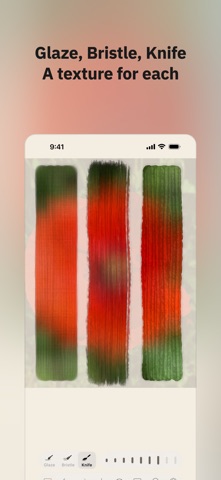
Pick a photo you like and rub the screen. You don't need to know how to paint; the time you put in fills the canvas. Color comes from the photo. The photo sits under the canvas as a faint underlay, and wherever you rub, its color at that spot becomes paint. You choose the brush and the size. No filter does the work, so a painting is finished only when the whole canvas is covered. One takes about 15 to 20 minutes. ■ Paint on the canvas • Paint with visible thickness • Brush marks you fix by painting over them • Eye button to check the original photo ■ Three brushes • Glaze, Bristle and Knife • Brush size in 9 steps • Underlay strength in 5 steps ■ The process stays • Replay at 1×, 2× or 4× speed • Vertical 9:16 time-lapse video • A record of dabs and time painted ■ BrushWorks Pro • Save without the watermark • Time-lapses of 10 to 90 seconds at 1080×1920 • Color lock: paint with one color you choose • Precision controls for wobble and brush size • Save at 1.5×, up to 3072 px • PNG, HEIF and TIFF formats Without Pro you still paint, save, use Replay and make 10-second time-lapses. Those saves carry a small watermark in the corner. ■ Privacy • No personal data collected • No account or sign-in • No ads or analytics
What's new · 1.0.2
• Updated brush texture
Details