

Credibility Analyzer
Evergreen Labs · Utilities
Independent analytics for this App Store listing. AppTracker is not affiliated with Evergreen Labs.
Chart standing · US
What changed · US
Listing changes AppTracker has observed for this app in this storefront — new versions, price moves, rating shifts, and store copy.
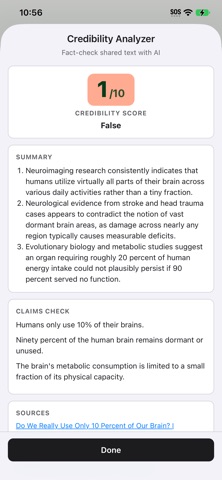
Fact-check a photo or screenshot from the share sheet, or an image on a web page. You still get a score, a claim check, and sources.
Screenshots

About
Credibility Analyzer is a Safari Web Extension that helps you judge whether a webpage, text you select, or a photo you share is reliable. Open a page and run an analysis from the toolbar, or share selected text or a photo into the app. You’ll get: • A credibility / factualness score from 1–10 • A short justification of that score • Clear bullet-point findings (3, 4, or 5 — configurable) • Source links when Gemini web grounding returns citations • Results in the same language as the page when possible AI models (bring your own API key) • Gemini Flash (latest) — Google’s current Flash model with live web grounding for fact-checking • Claude Sonnet — Anthropic’s Sonnet for knowledge-based analysis • GPT-6 Sol — OpenAI’s GPT-6 Sol for knowledge-based analysis Getting started The host app walks you through a short checklist: 1. Add an API key for Gemini, Claude, or OpenAI 2. Try fact-checking a sample myth with Share → Credibility Analyzer 3. Optionally enable the Safari extension in Settings → Apps → Safari → Extensions How to use (Safari toolbar) 1. Enable Credibility Analyzer in Settings → Apps → Safari → Extensions and grant site access 2. Visit a normal webpage 3. Tap the Credibility Analyzer toolbar button to analyze the page or selected text 4. Choose a model and run the analysis 5. Review the score, findings, and sources How to use (Share) 1. Select text in Safari (or another app), or share a photo or screenshot 2. Tap Share → Credibility Analyzer 3. Review the credibility results in the Share extension Privacy • Analysis runs only when you start it • Page content, a photo you share, and (optionally) the URL if you enable “Include URL context” are sent to the AI provider you selected, using your API key • API keys go only to the provider you chose — never to us • The developer does not run a backend that stores your page content • API keys stay in Safari extension / App Group storage on your device • No ads, no account required from us • Anonymous, privacy-first usage analytics (Aptabase) — page content and API keys are never sent Requirements • iPhone or iPad with Safari that supports Safari Web Extensions • An API key from Google AI Studio, Anthropic, and/or OpenAI for the models you want to use Notes • Safari and system pages cannot be analyzed • Cloud AI usage is billed by the provider under your account with them • Enable the extension and allow website access after installing the app Make complex articles easier to skim — and easier to trust or question — without leaving Safari.
What's new · 1.6.9
Fact-check a photo or screenshot from the share sheet, or an image on a web page. You still get a score, a claim check, and sources.
Details