

Gather Personal Dashboard
KERRI LYNN BRILLINGER · Productivity
Independent analytics for this App Store listing. AppTracker is not affiliated with KERRI LYNN BRILLINGER.
Chart standing · US
What changed · US
Listing changes AppTracker has observed for this app in this storefront — new versions, price moves, rating shifts, and store copy.
What's New in 1.7 - Custom themes: make up to 4 of your own colour themes with a colour picker. They sync with the desktop app. - New rich text editor for Journal and Notes: bold, italic, lists, fonts, sizes and colours. - Journal and Notes formatting and photos now sync with the desktop app. - Share cards: share a hobby as a card that shows your full cover photo. - Home: the "Currently enjoying" sheet now has Share and View in Hobbies buttons. - New Month view. - Outline logo option in Settings. - Fixes: - The keyboard no longer covers the Save button or shrinks the text box when you add a photo to a journal entry. - The QR scanner no longer shows a black screen. - Syncing no longer resets your palette or location. - Items you delete stay deleted after a sync. - Photos from the desktop app now sync to your phone.
Screenshots


About
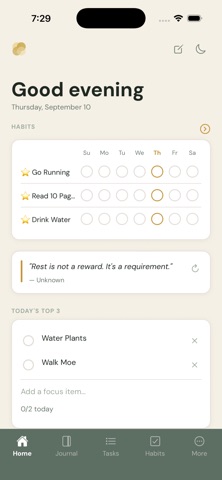
Gather started because we were tired. Tired of apps that wanted everything from us: our data, our attention, our money. So we built something different: a digital home. A quiet space that's entirely yours. A personal dashboard should feel like opening a leather journal, not logging into a service. It should reflect you, your tastes, your pace, your way of living. No one watching. No one optimizing. Gather keeps your data local because we trust you with your own life. No accounts to manage, no cloud syncing to worry about, no surprise changes. This is a tool built with care. For you. About you. Entirely you. Local-first, always yours The rejection of the cloud is not a technical limitation. It is a design pillar. Think of opening a notebook on your computer. Nothing syncs behind your back; any alignment between devices is a manual, intentional act by you. Your data moves only when you choose to move it. No accounts, no cloud Your thoughts, tasks, and interests belong to you. Not a server. Not a company. You. No logins, no profiles, no external services. Your data lives in a single JSON file on your machine, so it's technically difficult to track, share, or leak. The “yours” promise Gather is a digital object you own, not a service you rent. It works completely offline, forever. You decide how it looks, which features to use, and whether reminders exist at all. Every setting exists to make Gather a tool you actually want to open. Private by Design Gather collects zero data. No analytics, no tracking, no ads. Everything you enter lives on your device and nowhere else. Gather is perfect for anyone who wants one calm, beautiful place to hold their day without the noise of big productivity apps. Permission declaration: Permission: Read/write access to photo library Reason: Used only when the user chooses to add a cover image to an item in Currently Enjoying. Photos are never uploaded, shared, or stored outside the device.
What's new · 1.7
What's New in 1.7 - Custom themes: make up to 4 of your own colour themes with a colour picker. They sync with the desktop app. - New rich text editor for Journal and Notes: bold, italic, lists, fonts, sizes and colours. - Journal and Notes formatting and photos now sync with the desktop app. - Share cards: share a hobby as a card that shows your full cover photo. - Home: the "Currently enjoying" sheet now has Share and View in Hobbies buttons. - New Month view. - Outline logo option in Settings. - Fixes: - The keyboard no longer covers the Save button or shrinks the text box when you add a photo to a journal entry. - The QR scanner no longer shows a black screen. - Syncing no longer resets your palette or location. - Items you delete stay deleted after a sync. - Photos from the desktop app now sync to your phone.
Details