

Ciji Transcribe: Voice to Text
Yuan-Yi Chang · Productivity
Independent analytics for this App Store listing. AppTracker is not affiliated with Yuan-Yi Chang.
Chart standing · US
What changed · US
Listing changes AppTracker has observed for this app in this storefront — new versions, price moves, rating shifts, and store copy.
- Smoother, more reliable experience with under-the-hood improvements.
Screenshots


About
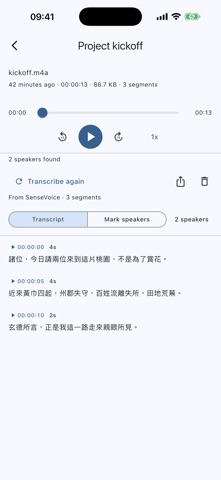
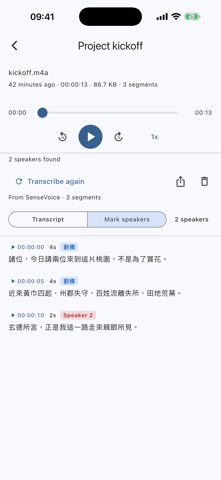
You already have the recording. This turns it into text. Bring in a meeting, a lecture, an interview — a file from a phone, a watch, a voice recorder, or one somebody sent you — and read it back as words with timestamps. The recognition runs on the device you are holding. Nothing is uploaded, and there is no account. --- Read it, and find the moment • Every line carries the time it was said; tap one and the audio plays from there • Playback from half speed to two and a half times, for the parts worth slowing down • Skip back or forward ten seconds without losing your place • Select and copy any line straight out of the transcript Who said which line • Work out how many people were talking and attribute each line to one of them • Runs as a separate step on a transcript that already exists, so nobody waits for it who does not want it • No length limit — an hour-long meeting costs more time, not more memory • Two ways to read the same transcript: plain, or with every line marked Fix what it got wrong • One person split into several? Tick them and merge them back into one • Give a speaker a name and it is used everywhere, including in exported files • Move a single line to somebody else when a short interjection landed with the wrong voice • Start the speaker step over without touching a word of the text Take it with you • Export as plain text, timestamped, one line per segment • Or as a subtitle file that plays alongside the original recording • With the speakers marked, or without — a transcript is read for what was said, and who said it is a second question • Goes out through the sharing sheet, so it can be saved, mailed or sent anywhere Choose how it listens • Eleven recognition models to download, from small and quick to large and careful • Each one says what languages it handles and what it does poorly, so the choice is yours to make • Run a second model over the same recording and keep both results side by side • Delete a model when you want the space back; download it again whenever Long recordings, handled • Pause a transcription and pick it up later from where it stopped • Leave the screen and it keeps going • Progress is shown as position in the audio, with an estimate of what is left • The screen stays awake while it works, because a locked phone is a stopped job --- What runs where • Recognition and speaker identification run on your device, in your hands • Your recordings are never uploaded, and there is no account to create • Models are downloaded once, from an open-source project, and then work without a network • The app is free and supported by ads • Every model and library it builds on is credited inside the app, with its licence Worth knowing before you download • The app does not record audio. It reads recordings you already have. • A recognition model has to be downloaded before the first transcription — a few hundred megabytes, kept until you delete it. Good for: • Reading back a meeting instead of listening to it again • Finding the one thing that was said, by its timestamp • Handing somebody a written record of a conversation • Subtitling a recording you already made
What's new · 1.0.1
- Smoother, more reliable experience with under-the-hood improvements.
Details