

iProfile - My World Card
Beijing Blue Ocean Xinfan Technology Co., Ltd · Social Networking
Independent analytics for this App Store listing. AppTracker is not affiliated with Beijing Blue Ocean Xinfan Technology Co., Ltd.
Chart standing · US
What changed · US
Listing changes AppTracker has observed for this app in this storefront — new versions, price moves, rating shifts, and store copy.
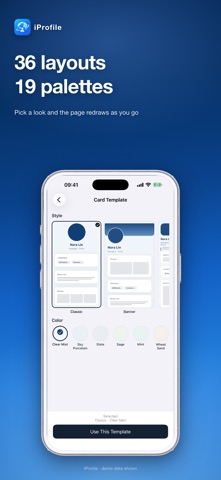
SHARE YOUR BIO LINK PAGE One tap sends your page to any app with a share sheet — messages, mail, notes. It opens at iprofile.world/u/yourname as a public page, so the other side needs nothing installed. Your username is now a permanent address you can put in any bio field. PAGE STYLES 36 layouts and 19 palettes, picked as two separate rows. The page redraws the moment you choose, and the public link renders the same style. FIRST-RUN SETUP Three short steps — let people recognize you, introduce the real you, choose who you want to meet — then a preview before your page goes public. You can hide it again at any time. LESS FRICTION • The app now waits for the system's wireless data prompt on first launch and retries on its own, instead of opening with a network error. • The meeting detail screen shows whether your greeting was answered and what the reply said, with their page one tap away. • Fixed: the report sheet's keyboard and scrolling, and the world map's layout on small screens and at large text sizes.
Screenshots


About
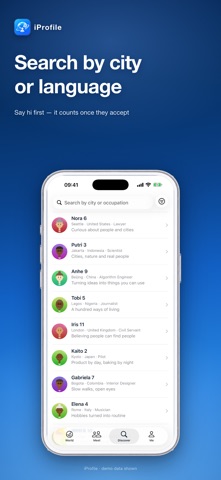
iProfile is a Bio Link Page, not a feed. Put your name, city, what you're working on, your interests and your links on one page. Next time you have to introduce yourself, you don't retype it — you hand the page over. WHAT'S NEW: SHARE YOUR PAGE • One tap sends your page to any app — messages, mail, notes, anything with a share sheet. The other side doesn't need iProfile to open it. • Every page has its own public address at iprofile.world/u/yourname, so it fits in the "link in bio" slot you already have. • Put up to 5 links on your page: your website, portfolio, blog or project, or links to other social platforms. • Set your page to private and that public address stops working right away. WHAT FITS ON A PAGE • Photo, display name, city and country, a one-line headline, an about section • Up to 5 things you're currently doing — update them whenever • Up to 10 interests • Up to 5 photos, drag to reorder • Up to 5 links • A username of 3-20 characters, which is also your page address 36 LAYOUTS x 19 PALETTES The layout sets the skeleton — centered, cover banner, side rail, ticket, postcard, film strip and more. The palette sets the mood. Mix the two; the page redraws as you pick. MEET PEOPLE INSTEAD OF SCROLLING • One page at a time on the home screen — swipe it aside for the next person • World map: see where other people's pages are • Discover: filter by city, country, occupation or language • Say hi: send a greeting with a reason; it only becomes a connection once they accept • Block and report are always there DETAILS • Interface in English, Simplified Chinese and Traditional Chinese • No ads, no in-app purchases, no subscription to unlock anything • Your page's visibility is yours to change at any time
What's new · 1.2
SHARE YOUR BIO LINK PAGE One tap sends your page to any app with a share sheet — messages, mail, notes. It opens at iprofile.world/u/yourname as a public page, so the other side needs nothing installed. Your username is now a permanent address you can put in any bio field. PAGE STYLES 36 layouts and 19 palettes, picked as two separate rows. The page redraws the moment you choose, and the public link renders the same style. FIRST-RUN SETUP Three short steps — let people recognize you, introduce the real you, choose who you want to meet — then a preview before your page goes public. You can hide it again at any time. LESS FRICTION • The app now waits for the system's wireless data prompt on first launch and retries on its own, instead of opening with a network error. • The meeting detail screen shows whether your greeting was answered and what the reply said, with their page one tap away. • Fixed: the report sheet's keyboard and scrolling, and the world map's layout on small screens and at large text sizes.
Details