

Collagearonis
Carson Li · Photo & Video
Independent analytics for this App Store listing. AppTracker is not affiliated with Carson Li.
Chart standing · US
What changed · US
Listing changes AppTracker has observed for this app in this storefront — new versions, price moves, rating shifts, and store copy.
Friends, rooms and reactions, smoother in 1.17. - Rooms and DMs open on All: every sticker, newest first, with a blue New on the ones you have not seen yet. The calendar beside it picks a single day - Peel all: on a pile in a room, and on the Me tab whenever there is something to peel - Friends & Rooms on the Me tab: your friends and your rooms in one list, with a search, a count of what you have not seen yet, and + for a new room - Your friend code has its own QR button at the top of the Me tab, and the QR wears the Peel logo - Reactions float slower and drift as they go; react with the button under the pile - In a room: Stack Stickers and Add New Sticker at the bottom, and a bell to mute or unmute it - A Share pill on a sticker's page; the heart sits by its emoji and Edit by Undo - Pull down to refresh on Stickers, Space and Me - The + brings you back to the tab you were on - iCloud sync: keep your stickers, collages and books the same on your iPhone and iPad. Off until you turn it on in Settings - The Store and About now live in Settings
In-app purchases · US
What this app sells inside itself, grouped by kind and priced for this storefront.
Screenshots




About
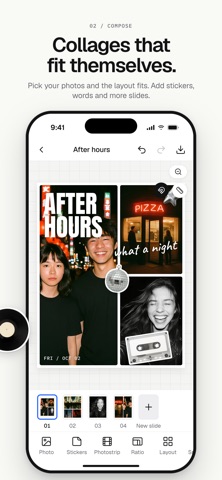
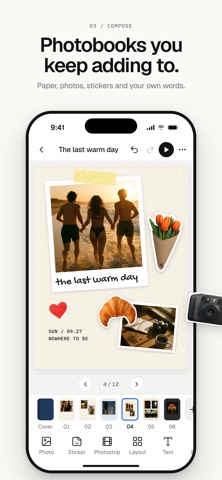
Peel is a place for the pieces of your life: your photos, your videos and the small things you cut out and keep. Collect them as stickers, compose them into collages and photobooks, keep it all in your space, and save anything to Photos to share it. No account needed. Everything you make stays on your phone. STICKERS - Point the camera at anything, or pick a photo, and the subject is cut out as a sticker - Peel it off its backing to keep it - Name your stickers, favorite them, file them in collections and search them by name - Change a sticker's shape, crop, edge and filter, go edgeless, or fix the cut with a refine brush - Stars, tape and other extras come with the app, and sticker bags add cut-out letters and numbers, heart patches, washi tape, cameras and more - Spell a word and it is laid out in letter stickers - Add words to a sticker, and tag stickers and collections with an emoji - The Map: your stickers on a map, where their photos were taken - Put them on collages and book pages COLLAGES - Choose up to 20 photos and Peel lays them out for you, over as many slides as they need, or choose a layout yourself and fill its tiles with photos and videos - Layouts for every count: grids, heroes, columns, pinwheels, scrapbook and polaroid arrangements - Square, portrait, story, landscape and more - Spacing, corners and a backdrop colour - 31 filters with a strength slider, for the whole collage or one photo - Grain, vignette, soft glow, light leak and fade - Text in more than 30 typefaces, stickers, drawing, and background removal with one tap - Loose photos and photostrips you can lay anywhere on a slide - A ruler, and snapping to the middle and the edges, for when things should line up - Several slides in one collage, ready to post as a carousel - Panorama layouts cut one photo across two slides so the halves line up in the feed - Videos in the tiles: trim a clip, choose whose audio plays, and save a video or a still - Export picks the slides, their order and the shape: as made, square, or tall for a story - Undo and redo, and your work is kept as you go PHOTOBOOKS - Pages you can keep adding to, with photos, photostrips, stickers, text and drawing - Paper colours and patterns, frames, and scissor edges for your photos - Page layouts, or place everything by hand - Auto-fill from an album: it picks your best shots, skips repeats and blurry ones, and lays them out day by day, all on your phone - A cover with a title and a photo - A reader that turns the pages, with music if you like YOUR SPACE - Every collage and photobook in one place - Folders for the collages that belong together THREE THEMES - Simple Light is quiet white and ink, Simple Dark turns it over, Wild is electric yellow and blue - Change your mind in Settings whenever you like SIMPLE OR ADVANCED - Simple keeps the tools you reach for most in view and the rest under More; Advanced puts every tool out - Switch in Settings whenever you like PHOTO EDITOR - Edit a single photo at full resolution: filters, crop by preset or a free crop you drag by the edges, rotate, cut out the subject - Saves a new copy to Photos TEMPLATES - Three templates are included - Template packs are optional in-app purchases, bought once and kept: Intro Pack, Wedding Weekend, Birthday Bash and Good Work Peel comes in English, Spanish, French, German, Brazilian Portuguese, Japanese and Korean. Private by design. Your photos are read from your library and written back to it, and that is all. No account needed, no ads, no tracking, and your photos are never uploaded.
What's new · 1.18
Friends, rooms and reactions, smoother in 1.17. - Rooms and DMs open on All: every sticker, newest first, with a blue New on the ones you have not seen yet. The calendar beside it picks a single day - Peel all: on a pile in a room, and on the Me tab whenever there is something to peel - Friends & Rooms on the Me tab: your friends and your rooms in one list, with a search, a count of what you have not seen yet, and + for a new room - Your friend code has its own QR button at the top of the Me tab, and the QR wears the Peel logo - Reactions float slower and drift as they go; react with the button under the pile - In a room: Stack Stickers and Add New Sticker at the bottom, and a bell to mute or unmute it - A Share pill on a sticker's page; the heart sits by its emoji and Edit by Undo - Pull down to refresh on Stickers, Space and Me - The + brings you back to the tab you were on - iCloud sync: keep your stickers, collages and books the same on your iPhone and iPad. Off until you turn it on in Settings - The Store and About now live in Settings
Details