

AcousticOwl: Room Acoustics
Tectora LLC · Utilities
Independent analytics for this App Store listing. AppTracker is not affiliated with Tectora LLC.
Chart standing · US
What changed · US
Listing changes AppTracker has observed for this app in this storefront — new versions, price moves, rating shifts, and store copy.
What's New - Ceilings get their own step: sloped and vaulted ceilings, beams, soffits and sprinkler heads are all supported. - New side views show speaker, ear and ceiling heights at a glance. - New room types: Living room and Office, plus home theater seating. - Smarter treatment plans that recommend fewer panels while still hitting your target. - A simpler, cleaner editor with step icons, less text and easier dragging. - Bug fixes and polish.
Ratings breakdown · US
The star breakdown behind this app's rating in this storefront.
Screenshots


About
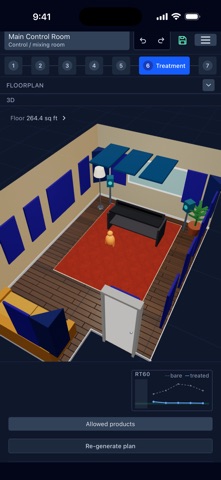
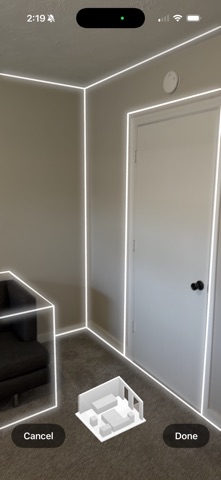
Work out how many acoustic panels a room needs, and where to put them. AcousticOwl models your room, predicts how it will sound, and designs a treatment plan you can actually buy and hang. It is built on published absorption data and standard acoustics formulas, not rules of thumb. MEASURE THE ROOM Scan it with LiDAR on a Pro iPhone and the floor plan builds itself, walls and corners included. No LiDAR, or an odd-shaped room? Draw the outline top-down in a few taps and set the ceiling height. Photograph a wall and the app finds its windows and doors for you, then places them at the right size and height. The image analysis runs entirely on your device — the photo is never sent anywhere for processing. SEE WHAT IS WRONG - RT60 reverberation time per octave band, 125 Hz to 4 kHz, using Sabine or Eyring with ISO 9613-1 air absorption - Your result charted against the recommended range for your room type, so "too live" is a number rather than an impression - Room modes: axial, tangential and oblique standing waves for rectangular and near-rectangular rooms, so you know which bass notes will boom and which will disappear - Every surface's contribution, so you can see whether the problem is the ceiling, the glass or the floor GET A PLAN Pick a room type — control room, home theater, podcast studio, live room, classroom, restaurant, gym and eleven more — and the planner designs a treatment layout for it. It works to that room type's target reverberation time, respects doors, windows and obstructions, and won't specify foam where fire codes forbid it. You get panel positions on real walls, quantities, and a running cost. Build several plans over the same room and compare their predicted RT60 side by side before spending anything. SEE IT IN THE ROOM Sketch in 2D from above, then look at the finished room as a fully extruded 3D model with every panel where it will actually go. REAL DATA A catalog of surface materials and acoustic products carrying published octave-band absorption coefficients. Add your own materials and products when you're working with something the catalog doesn't cover, or when a manufacturer publishes their own figures. SHARE IT Designs sync to your account across devices. Send a read-only link and anyone can open your room and its plan in a browser, no account needed — useful for showing a client, a bandmate or a landlord what you're proposing. WHO IT IS FOR Home studio and project studio owners, podcasters, mixing and mastering engineers, home cinema builders, church and school AV teams, and anyone whose room sounds worse than their gear.
What's new · 1.2.2
What's New - Ceilings get their own step: sloped and vaulted ceilings, beams, soffits and sprinkler heads are all supported. - New side views show speaker, ear and ceiling heights at a glance. - New room types: Living room and Office, plus home theater seating. - Smarter treatment plans that recommend fewer panels while still hitting your target. - A simpler, cleaner editor with step icons, less text and easier dragging. - Bug fixes and polish.
Details