

Monoqulo
Masamichi Ueta · Photo & Video
Independent analytics for this App Store listing. AppTracker is not affiliated with Masamichi Ueta.
Chart standing · US
What changed · US
Listing changes AppTracker has observed for this app in this storefront — new versions, price moves, rating shifts, and store copy.
Minor fixes
In-app purchases · US
No in-app purchases.
Screenshots



About
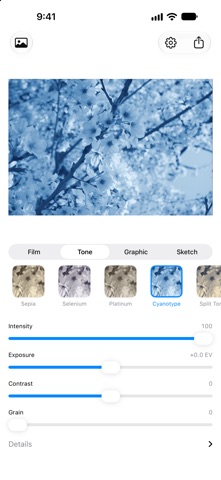
Monoqulo turns your photo into black and white. Tap one of 23 styles and you're done. No photography know-how or complicated settings needed. HOW IT WORKS 1. Choose a photo 2. Tap a style you like 3. Tap Export to save it to Photos or share it 23 STYLES Film (7) Black and white that looks like it was shot on a film camera. - Neutral: plain, natural black and white - Yellow Filter: blue skies get a little darker, so clouds stand out - Red Filter: blue skies turn dark and dramatic - Classic 400: the go-to black and white, crisp with visible grain - Fine 100: tiny grain and smooth tones - Push 3200: coarse grain and strong contrast, gritty and raw - Infrared: green leaves glow white, for a dreamlike look Tone (5) Adds a tint, such as brown or blue, to black and white. - Sepia: warm brown, like an old photograph - Selenium: cool blacks with a hint of purple - Platinum: soft, warm grays - Cyanotype: deep blue and white - Split Tone: bluish shadows and warm highlights Graphic (7) Redraws the photo with dots, lines and flat shapes, like a printed page or an old computer screen. - Halftone: tiny dots, like a photo in a newspaper - Line Screen: rows of lines that get thicker in darker areas - Threshold: only black and white, nothing in between - Atkinson: fine dots, like the screen of the original Macintosh - Bayer: an even grid of dots, like a retro video game - Posterize: a few flat shades, like a poster - Riso: patchy ink and slight misalignment, like a printed flyer Sketch (4) Looks like it was drawn by hand. - Line Art: the outlines, as if traced with a pen - Charcoal: a bold charcoal drawing - Pencil: a delicate pencil sketch - Blueprint: white lines on blue paper, like a technical drawing ADJUSTMENTS You don't have to touch the sliders. They are there for when you want a little more or less of something. - Adjust Intensity, Exposure (brightness), Contrast and Grain - Open Details to adjust bright and dark areas separately, or darken the corners - Tone, Graphic and Sketch styles also get a slider of their own, such as toning strength, dot size or line weight - Double tap a slider's name to reset it - Press and hold the photo to compare it with the original SAVING AND SHARING - Saved at the original size. Nothing is shrunk - No watermark - The date and camera details are kept. You can remove the location in the app's settings - Photos normally save as HEIC, the same format as iPhone photos. Graphic styles save as PNG so fine patterns stay crisp WHAT IT DOES NOT DO - No internet connection. The app never sends your photos anywhere - No tracking or analytics - No account, no sign-in - No ads - It doesn't ask for access to your whole photo library. It only opens the one photo you pick - The only permission it asks for is to save your finished photo to Photos iPhone and iPad. English and Japanese.
What's new · 2.0.0
Minor fixes
Details