

SoundFlow - Your Music In Flow
榆麟 邓 · Music
Independent analytics for this App Store listing. AppTracker is not affiliated with 榆麟 邓.
Chart standing · US
What changed · US
Listing changes AppTracker has observed for this app in this storefront — new versions, price moves, rating shifts, and store copy.
This update brings richer music discovery, a more engaging playback experience, and all-new CarPlay support. New Features - Added CarPlay support. Browse Home, playlists, favorites, and your library, and control playback in your car. - Added discovery playlists from different providers and regions. Play matching tracks from your Navidrome library or import them into your own playlists. - Added animated album and artist artwork. - Added external lyrics search, manual lyrics selection, and preferences for line-by-line or word-by-word lyrics. - Added Last.fm account linking and scrobbling. - Added a music recommendation widget for your Home Screen. - Added search history to help you find your favorite music again. - Added an offline demo library so you can explore key features without connecting to a server. Improvements - Customize which Home sections appear and their order. - Added player artwork styles and color options, with improved player transitions and lyrics effects. - Expanded playlist management: edit names, descriptions, and visibility; replace or remove covers; and delete playlists. - Added automatic playback resume settings for your phone and CarPlay. - Improved autoplay, rapid track switching, and continuous playback of discovery playlists. - Improved Chinese lyrics on system media surfaces by splitting longer lines into shorter phrases. - Optimized artwork loading and caching for a smoother launch and browsing experience. - Improved translations and the SoundFlow Pro lifetime purchase screen. Fixes - Fixed lyrics falling out of sync after resuming playback from a cold launch. - Fixed issues with playback queue restoration, synchronization, and Previous Track availability. - Improved playback recovery on unstable connections. - Fixed incomplete scrolling in Favorites and issues with navigation and artwork transitions. - Fixed discovery filter refresh issues and improved content preservation and feedback when loading fails.
In-app purchases · US
What this app sells inside itself, grouped by kind and priced for this storefront.
Screenshots


About
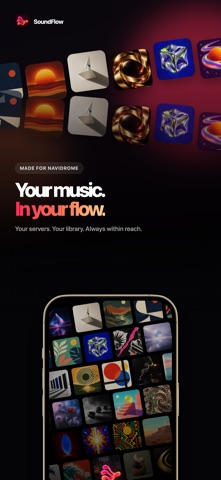
SoundFlow is a beautifully designed music player made for Navidrome. Connect to your self-hosted music library and enjoy a fast, focused listening experience built specifically for iPhone and iPad. SoundFlow combines a native Apple-style interface with the freedom and privacy of your own music server. Key Features: • Connect to multiple Navidrome servers • Browse songs, albums, artists, playlists, and music libraries • Stream music directly from your personal server • Cache music for offline listening • Manage your playback queue and favorites • View synchronized lyrics when available • Control playback from the Lock Screen and Control Center • Listen through AirPlay-compatible devices • Back up your settings and server configurations with iCloud • Enjoy a native interface designed for iOS Your Music, Your Server SoundFlow connects directly to your Navidrome server. Your music library remains under your control, without being tied to a commercial streaming catalog. To use SoundFlow, you need access to a Navidrome server. Music content and a Navidrome account are not included. SoundFlow is an independent client and is not affiliated with or endorsed by the Navidrome project. Privacy: https://doc.ixiaoxiang.cn/soundflow/privacy-policy Terms: https://doc.ixiaoxiang.cn/soundflow/user-agreement
What's new · 0.2.0
This update brings richer music discovery, a more engaging playback experience, and all-new CarPlay support. New Features - Added CarPlay support. Browse Home, playlists, favorites, and your library, and control playback in your car. - Added discovery playlists from different providers and regions. Play matching tracks from your Navidrome library or import them into your own playlists. - Added animated album and artist artwork. - Added external lyrics search, manual lyrics selection, and preferences for line-by-line or word-by-word lyrics. - Added Last.fm account linking and scrobbling. - Added a music recommendation widget for your Home Screen. - Added search history to help you find your favorite music again. - Added an offline demo library so you can explore key features without connecting to a server. Improvements - Customize which Home sections appear and their order. - Added player artwork styles and color options, with improved player transitions and lyrics effects. - Expanded playlist management: edit names, descriptions, and visibility; replace or remove covers; and delete playlists. - Added automatic playback resume settings for your phone and CarPlay. - Improved autoplay, rapid track switching, and continuous playback of discovery playlists. - Improved Chinese lyrics on system media surfaces by splitting longer lines into shorter phrases. - Optimized artwork loading and caching for a smoother launch and browsing experience. - Improved translations and the SoundFlow Pro lifetime purchase screen. Fixes - Fixed lyrics falling out of sync after resuming playback from a cold launch. - Fixed issues with playback queue restoration, synchronization, and Previous Track availability. - Improved playback recovery on unstable connections. - Fixed incomplete scrolling in Favorites and issues with navigation and artwork transitions. - Fixed discovery filter refresh issues and improved content preservation and feedback when loading fails.
Details