

CueKeep: Bills & Renewals
Jiri Kluciar · Productivity
Independent analytics for this App Store listing. AppTracker is not affiliated with Jiri Kluciar.
Chart standing · US
What changed · US
Listing changes AppTracker has observed for this app in this storefront — new versions, price moves, rating shifts, and store copy.
Version 1.2 means less manual work. • Handle payments and tasks directly from a notification: Paid, Done, Payment didn't go through or Remind me tomorrow, depending on the item. Postponing a reminder keeps the due date unchanged. • No need to tick off automatic payments every month. If a payment fails, flag it and CueKeep will track it as unpaid. • Pause items, end them on a chosen date and resume them from the archive. • A simpler form shows the essentials, with other settings under More options. Duplicate an item to quickly add a similar one. • Set your payday to the last day of the month. Fixed date and payday changes that could skip or duplicate payments or create incorrect overdue amounts. The Next 30 days card now excludes paid dates, and amount entry catches invalid values more reliably.
Screenshots


About
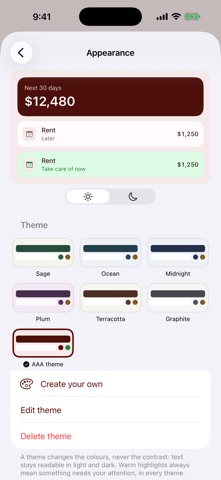
Time is money. Money is time. Everything that comes back around costs you one, the other, or both — and nothing keeps a single list of it. CueKeep does. Rent, car insurance, the boiler service, a passport that runs out and Netflix are one problem: they repeat, they cost you a payment or an afternoon, and forgetting one hurts. Only the interval and the warning you need are different. TIME: SORTED BY THE WARNING YOU NEED Every item carries its own notice, taken from what you actually have to get done. A vehicle inspection due in 30 days outranks a subscription due in 20, because booking a slot takes weeks and cancelling a service takes an evening. Whatever you can act on today sits at the top. The rest waits below. MONEY: A TOTAL THAT DOES NOT LIE The next 30 days, rolling — not the calendar month, because "how much do I need ready" is a question you ask every day. Contract amounts and your own estimates are added up separately, so a guess at the cost of new tyres never masquerades as a figure off a bill. When a month is dearer than usual, CueKeep says so in one line. THE THINGS NOBODY TRACKS Other apps hold only what you pay for. CueKeep also holds what you have to do: the inspection, the dentist, the boiler check, the licence that expires. Those are the ones that slip, because they come round too rarely to ever become a habit — and they cost you both currencies at once. THREE KINDS OF REPEATING, BECAUSE THEY BEHAVE DIFFERENTLY Rent falls on the 31st whether or not you paid late. A streaming service simply goes out with your salary, so it needs no date at all. A tyre change is six months from the last time you did it, so doing it late moves the next one too. Get this distinction wrong and every reminder lands on the wrong day. THE NUMBER, THE LINK, THE DATE YOU AGREED Keep the garage's phone number and the booking page on the item itself, so the reminder arrives with the means to act on it instead of sending you hunting. Once you have made the appointment yourself, note the time on the item and CueKeep will remind you at it — a reminder of its own, on top of the advance warnings. A booked slot is not a finished job, though, and CueKeep keeps the two apart until you mark it done. One tap undoes that if you were too quick. Not ready to deal with it at all? Postpone the reminder — the due date stays exactly where it was. FIVE SECONDS TO ADD SOMETHING Over sixty presets fill in the period, the kind and the notice for you. Search by brand: type Netflix and you get a streaming subscription, already named. Two fields left, and both are optional — how much, and when. A PLAN, NOT A LEDGER No budgets, no spending categories, no charts of where it all went. CueKeep keeps what you have ticked off, so you can see when the boiler was last done — but the numbers it shows you are always the ones still ahead of you. MAKE IT YOURS Six themes, or mix your own, with a choice of typeface and text size. A theme changes the colours, never the contrast, so nothing turns into grey on white in either light or dark mode. Warm highlights always mean the same thing in every theme: this one wants something from you. Your widget follows along. YOURS, ON YOUR DEVICE No account, no sign-up, no tracking. The backup is one plain JSON file that you export and import yourself, replacing what you have or merging into it. How the app looks stays on this device, so someone else's backup never repaints it. A home screen widget shows what is next and the next 30 days.
What's new · 1.2
Version 1.2 means less manual work. • Handle payments and tasks directly from a notification: Paid, Done, Payment didn't go through or Remind me tomorrow, depending on the item. Postponing a reminder keeps the due date unchanged. • No need to tick off automatic payments every month. If a payment fails, flag it and CueKeep will track it as unpaid. • Pause items, end them on a chosen date and resume them from the archive. • A simpler form shows the essentials, with other settings under More options. Duplicate an item to quickly add a similar one. • Set your payday to the last day of the month. Fixed date and payday changes that could skip or duplicate payments or create incorrect overdue amounts. The Next 30 days card now excludes paid dates, and amount entry catches invalid values more reliably.
Details