

Slope Hi-Fi
LUIGI DI MAURO · Utilities
Independent analytics for this App Store listing. AppTracker is not affiliated with LUIGI DI MAURO.
Chart standing · US
What changed · US
Listing changes AppTracker has observed for this app in this storefront — new versions, price moves, rating shifts, and store copy.
- Improved iCloud sync. - Fixed the Summation check without a crossover. - Fixed the volume note during the sweep. - Fixed the chart crossover marker when set on an open result. - Fixed the A/B comparison on iPad. - Improved the measurement detail layout on iPad full screen. Thanks for using Slope!
Screenshots


About
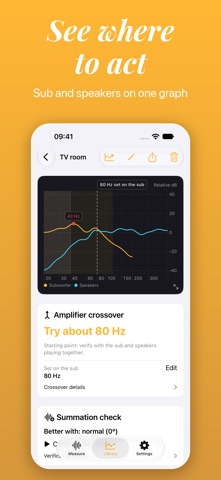
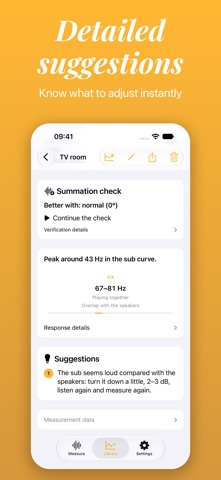
Slope shows how your subwoofer and speakers respond in your room. Using the iPhone microphone, it plays a sweep through your system, records the result and turns it into a clear graph with practical advice on what to adjust. What Slope does • Sub and speaker graph: both responses on one chart, with the crossover area highlighted. • Crossover advice: a range to try, based on how your speakers roll off. Enter the crossover you set on your subwoofer, and the graph, the Summation check and the PDF summary use it. • Subwoofer level: whether to raise or lower it, with a small step to check by ear when your speakers are full-range. • Summation check: two measurements with sub and speakers playing together, one for each position of the phase switch. Slope shows which position makes the bass add up better around the crossover. • Guided session: a step-by-step path for sub and speakers, with a level check you can repeat after adjusting the subwoofer, without measuring the speakers again. • Library: all your measurements, with two results compared side by side. Optional iCloud sync keeps them up to date on your other devices signed in to the same account. • PDF summary: a one-page report with the graph, key values, suggestions and measurement conditions. • Tour: an optional introduction to reading a response. It changes nothing in your measurements. Before you measure • You need an external audio output that plays the sweep through your speakers. Headphones and the iPhone's own speaker cannot be used for measurements. • Keep the room as quiet as possible. The Noise check on the Measure screen tells you the conditions before you start. Slope is a practical tuning tool, not an absolute measurement instrument. The iPhone microphone is not calibrated, so use the results to compare and adjust in your room, not as certified figures. Below 40 Hz the readings are less reliable and are marked as such. Slope changes nothing in your system: it suggests, and you decide what to adjust.
What's new · 1.2.1
- Improved iCloud sync. - Fixed the Summation check without a crossover. - Fixed the volume note during the sweep. - Fixed the chart crossover marker when set on an open result. - Fixed the A/B comparison on iPad. - Improved the measurement detail layout on iPad full screen. Thanks for using Slope!
Details