

Folvia: PDF Invoice Maker
Ahmet Yilmaz · Business
Independent analytics for this App Store listing. AppTracker is not affiliated with Ahmet Yilmaz.
Chart standing · US
In-app purchases · US
No in-app purchases.
Screenshots



About
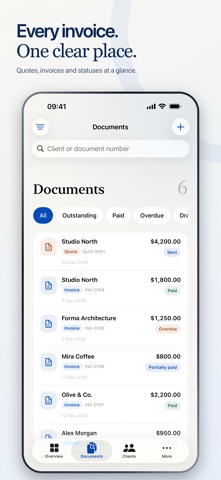
Create invoices that look like your business. Folvia helps freelancers and small business owners prepare quotes, share polished PDFs and track what clients have paid and what is still due. FROM QUOTE TO INVOICE Create estimates and quotes with your services, prices and terms. Turn an approved quote into an invoice without entering the same details again. Keep client information and a reusable product and service catalog close at hand. MAKE EVERY PDF YOUR OWN Choose a design and customize your logo, fonts, colors and spacing. Add your business signature and control its visibility for each document. Preview the result, save your favorite designs and share your PDF in A4 or US Letter. KEEP PAYMENTS IN VIEW Record the payments you receive, including partial payments, with a date, method and note. See outstanding balances, overdue invoices and monthly collections. Choose a percentage of the remaining balance to fill a payment amount, then save when ready. Set reminders for yourself and add due dates to your calendar. LESS REPETITION, MORE CONSISTENCY Save formatted notes for reuse and choose a business default for new documents. Import client details from Contacts. Use square metres, cubic metres or your own units for products and services. HANDLE THE DETAILS Add item taxes, discounts, deposits and payment terms. Create receipts and credit notes. Work with different currencies and keep an exchange rate with each document. Choose document languages and number and date formats. Review corrections and revisit previous PDF versions. Built for iPhone and iPad, with light and dark appearance, widgets and Shortcuts. Start with your business details, add a client and create your first invoice with Folvia.
What's new · 1.1
• Choose from new PDF designs with refined typography and layouts. • Draw or import your business signature and choose whether it appears on each document. • Format notes with bold, italic, underline and strikethrough. Save notes for reuse or set a default for new documents. • Use square metres, cubic metres and custom units in your catalog and documents. • Import a contact while adding a client from an invoice. • Fill payment amounts with 25%, 50%, 75% or 100% of the remaining balance. • Open your catalog from its own tab, switch between details and preview, and customize PDFs from the preview screen.
Details