

Cherry Studio App
Shanghai Qianhui Technology Co., Ltd. · Productivity
Independent analytics for this App Store listing. AppTracker is not affiliated with Shanghai Qianhui Technology Co., Ltd.
Chart standing · US
What changed · US
Listing changes AppTracker has observed for this app in this storefront — new versions, price moves, rating shifts, and store copy.
New features • A dedicated skill library lets you discover, install, and manage CherryIN skills and enable or disable them for individual agents. • Minimal mode supports text conversations and image understanding, plus built-in web access when supported by the selected model. • Expanded web search, page reading, and source citations, with more configurable search and content extraction services. • Code Mode can combine authorized tools through JavaScript to complete multi-step tasks. • Edit images in chat attachments and the file library with cropping, rotation, flipping, straightening, perspective adjustments, undo, redo, and original-image comparison. • Delete multiple conversations at once. • Submit feedback in the app and track its reference number and progress. Fixes and improvements • Improved responsiveness when sending messages, streaming responses, and loading long conversations, with automatic retries and visible status after interrupted responses. • Clearer reasoning content, source citations, and model usage details. • Fixed issues with follow-up web searches, skill refresh after installation, and model compatibility. • Improved desktop connections and remote chat, including large message histories and attachment uploads to some older desktop versions. • Fixed navigation after pairing, reconnecting, importing provider settings, and first-time setup. Desktop connection improvements require Cherry Studio desktop 2.1.5 or later. Model and tool capabilities depend on the selected providers and configuration.
Ratings breakdown · US
The star breakdown behind this app's rating in this storefront.
Screenshots



About
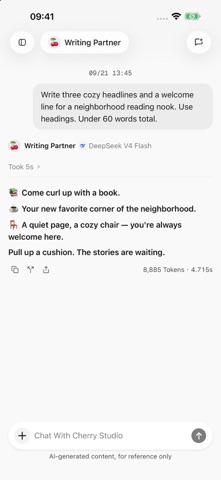
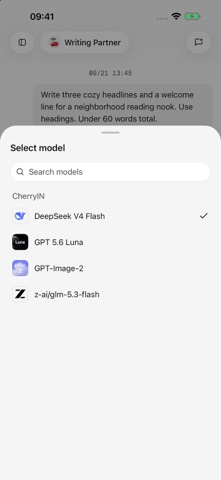
Cherry Studio is an AI workspace for iPhone and iPad, bringing together multi-model conversations, agents, image creation, and tool connections. Connect your chosen models Configure model services and API keys, manage multiple models in one app, and choose the capabilities that fit each task. Model availability and support for text, images, and files depend on the services you configure. Use conversations for work and creativity Chat about writing, learning, organizing information, and everyday questions. Read responses as they are generated, and add images and text attachments to provide context. Create your own agents Set names, instructions, default models, and tools for different purposes, and keep conversations for different projects organized separately. Turn ideas into images Connect a model that supports image generation, start with a text prompt or an existing image, and view and manage your image creation history. Connect tools when you need them Configure search services, plugins, or MCP tool servers to give agents access to web search and external tools. Availability depends on service configuration and permissions. With your permission, agents can also use calendar and reminder tools. Organize and share your results Manage attachments and generated files, preview documents, and export supported conversation content as Markdown, HTML, or images. You can also pair with the Cherry Studio desktop app to import supported model service configurations. Before you start The app is free to download. Model services and third-party tools may require separate accounts or API keys, and their providers may charge for usage. Conversation history is stored on your device. When you use models or online tools, relevant inputs are sent from your device to the services you configure. Each provider's data handling is governed by its own policies. The app also includes error diagnostics and usage statistics; see the privacy policy for details about what is collected. AI-generated content may contain errors. Please verify important information.
What's new · 0.2.1
New features • A dedicated skill library lets you discover, install, and manage CherryIN skills and enable or disable them for individual agents. • Minimal mode supports text conversations and image understanding, plus built-in web access when supported by the selected model. • Expanded web search, page reading, and source citations, with more configurable search and content extraction services. • Code Mode can combine authorized tools through JavaScript to complete multi-step tasks. • Edit images in chat attachments and the file library with cropping, rotation, flipping, straightening, perspective adjustments, undo, redo, and original-image comparison. • Delete multiple conversations at once. • Submit feedback in the app and track its reference number and progress. Fixes and improvements • Improved responsiveness when sending messages, streaming responses, and loading long conversations, with automatic retries and visible status after interrupted responses. • Clearer reasoning content, source citations, and model usage details. • Fixed issues with follow-up web searches, skill refresh after installation, and model compatibility. • Improved desktop connections and remote chat, including large message histories and attachment uploads to some older desktop versions. • Fixed navigation after pairing, reconnecting, importing provider settings, and first-time setup. Desktop connection improvements require Cherry Studio desktop 2.1.5 or later. Model and tool capabilities depend on the selected providers and configuration.
Details