

Plotter: Aviation Charts
Yigit Can Akinci · Navigation
Independent analytics for this App Store listing. AppTracker is not affiliated with Yigit Can Akinci.
Chart standing · US
What changed · US
Listing changes AppTracker has observed for this app in this storefront — new versions, price moves, rating shifts, and store copy.
• Move the ruler more freely in every direction and bring it back into view when needed. • Collapse the top, side and bottom menus to see more of the map. • Full screen hides the panels and drawing palette while keeping your selected drawing tool available. Your previous layout returns when you exit. • Hide or show the ruler with a button that stays available in full screen.
In-app purchases · US
What this app sells inside itself, grouped by kind and priced for this storefront.
Screenshots



About
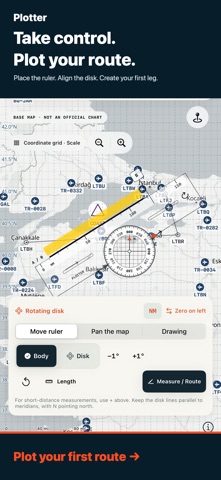
Plan your flight by hand with Plotter on iPhone and iPad. Place a transparent navigation ruler on the map, align the rotating grid and keep your measurements, drawings and study notes in one workspace. A MANUAL PLOTTER ON YOUR MAP • Move, rotate and resize the ruler. Turn its gridded disk independently of the body. • Align the grid with map meridians, read reciprocal directions and choose nautical or statute miles. • Zoom in for shorter distances: distance marks recalibrate to the map scale. • Record your own readings, then compare them with calculated references when you choose. DRAW AND KEEP YOUR WORK Use Apple's drawing tools for pens, markers, erasers, colors and line widths. Apple Pencil works on supported iPads. Drawings stay attached to geographic positions when you pan or zoom. Add your own VOR, VOR/DME, NDB, airfield and reporting-point symbols, names and notes. Routes, drawings, symbols and student notes remain saved on your device when you reopen the app. Share a complete study document or export route JSON/GPX and navigation-log CSV. MAPS THAT TRAVEL WITH YOU Choose a whole-world package of approximately 4.05 GB or 8.53 GB, or download the visible area at your preferred detail level. Check size, follow progress, pause and resume. Offline coverage ends at the downloaded area and detail level; zooming further adds no new data. Initial downloads need internet and sufficient storage. PLAN AND LEARN Use route, wind-correction, heading, time, fuel and E6B calculations with your own inputs. View NOAA METAR observations and their timestamps. Optional GPS recording works while the app is active. The interface supports English, Arabic, French, German, Italian, Russian, Spanish and Turkish. Map place names depend on the available source data. No separate Plotter account is required. SUBSCRIPTION Map and study tools require a monthly auto-renewing subscription. Eligible users receive a 3-day free trial, then the U.S. reference price is USD 4/month. Apple shows the actual local price, currency and trial eligibility before you confirm. Without a trial, payment applies when you confirm the purchase. Payment is charged to your Apple Account. The subscription renews monthly unless canceled. To avoid trial renewal, cancel at least 24 hours before it ends in Settings > your name > Subscriptions. Deleting the app does not cancel the subscription. Expiry does not automatically delete saved work or downloaded files. Plotter is a planning and learning aid. The basemap is not an official or certified aeronautical chart. Use current official charts, NOTAMs, weather briefings and approved aircraft data. User symbols are annotations, not a live navaid database. Sharing a route does not file an ATS flight plan. New METAR requests require internet; map offline mode does not disable weather or Apple connections. GPS recording stops in the background. Privacy: https://akincijet.com/plotter/privacy/ Terms of Use (Apple EULA): https://www.apple.com/legal/internet-services/itunes/dev/stdeula/ Support: https://akincijet.com/plotter/support/
What's new · 1.0.2
• Move the ruler more freely in every direction and bring it back into view when needed. • Collapse the top, side and bottom menus to see more of the map. • Full screen hides the panels and drawing palette while keeping your selected drawing tool available. Your previous layout returns when you exit. • Hide or show the ruler with a button that stays available in full screen.
Details