

Syn-Waves: Audio Editor
SYN-FX LP · Music
Independent analytics for this App Store listing. AppTracker is not affiliated with SYN-FX LP.
Chart standing · US
What changed · US
Listing changes AppTracker has observed for this app in this storefront — new versions, price moves, rating shifts, and store copy.
Ratings breakdown · US
The star breakdown behind this app's rating in this storefront.
In-app purchases · US
What this app sells inside itself, grouped by kind and priced for this storefront.
Screenshots





About
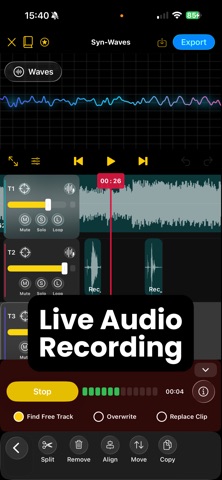
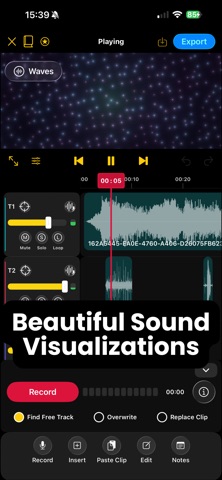
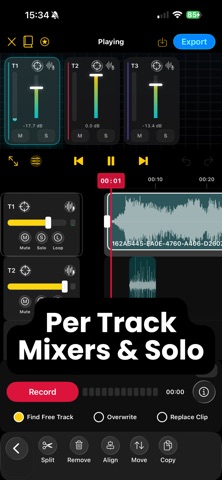
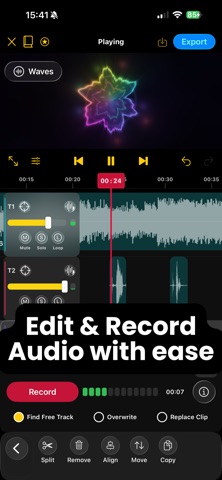
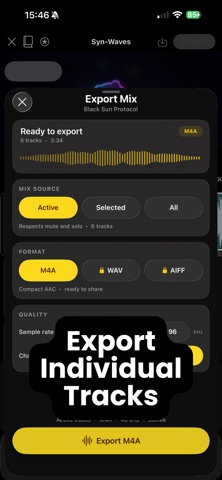
Syn-Waves is a simple yet powerful mobile audio editor built for recording, arranging, mixing, and visualizing sound. Create songs, podcasts, voiceovers, interviews, sound designs, and everyday recordings in one focused workspace. Record into a multi-track timeline, import existing audio, shape every clip, and watch your sound come alive through beautiful real-time visualizers. Whether you’re a musician, podcaster, voice artist, filmmaker, or simply capturing an idea before it disappears, Syn-Waves helps you move from first take to finished mix wherever inspiration strikes. FEATURES Multi-Track Audio Editing Build detailed arrangements with a flexible waveform timeline. • Record or import audio on multiple tracks • Trim, split, move, copy, paste, and delete clips • Edit with simplicity and ease Recording Made Simple • Start a project directly from a recording • Record onto an existing or new track • Replace a clip or overwrite part of an arrangement • Follow the live waveform and input meter Mixing & Track Controls • Adjust track volume easily • Mute or solo individual tracks • Loop individual tracks or the full arrangement • Close timeline gaps quickly • Preview the complete mix in real time Beautiful Audio Visualizers See your sound move through several responsive visual experiences, including Spectrogram, Aurora, Constellation, Chroma Keys, and more. Switch visualizers while listening or open fullscreen for an immersive playback experience. Voice Enhance Give speech and vocals clarity, presence, and control. • Shape tone with Voice EQ • Remove low-frequency rumble • Balance loud and quiet moments with compression • Catch sudden peaks with a limiter • Choose voice presets or fine-tune the sound • Compare enhanced and original audio before applying Flexible Audio Export • Export as M4A, WAV, or AIFF • Choose 44.1 kHz, 48 kHz, or 96 kHz • Export in mono or stereo • Export active tracks, a selected track, or every track • Quickly reuse your latest export settings Project Organization • Organize projects into folders • Rename, move, and duplicate projects • Import and export complete Syn-Waves projects • Add notes that stay with each project • Create a project from an audio file Private & Ready Anywhere Your projects and audio are stored locally on your device. Edit offline and keep creating wherever you are. Built-In Guide Learn recording, timeline editing, track controls, visualizers, shortcuts, saving, and export directly inside the app. Syn-Waves is made for musicians, songwriters, podcasters, interviewers, voice artists, filmmakers, content creators, sound designers, and anyone who wants a focused mobile audio editor. Sound has shape. Make it yours with Syn-Waves. --- SYN-WAVES PRO — AUTO-RENEWABLE SUBSCRIPTION Subscribe to Syn-Waves Pro to unlock unlimited audio projects, export mixes with enhanced voice processing, and receive ongoing improvements. • Subscription options are available monthly or annually • Payment is charged to your Apple Account at confirmation • Your subscription renews automatically unless auto-renew is turned off at least 24 hours before the end of the current period • Your account will be charged within 24 hours before the end of the current period if auto-renew is enabled • You can manage your subscription and turn off auto-renew in your Apple Account settings after purchase Terms of Use: https://www.syn-fx.com/waves-terms Privacy Policy: https://www.syn-fx.com/waves-privacy Apple EULA: https://www.apple.com/legal/internet-services/itunes/dev/stdeula/ --- Thank you for supporting Syn-Waves. Questions, feedback, bug reports, or feature suggestions: support@syn-fx.com
Details