

GopherForge: Go Workbench
Serhii Ziborov · Developer Tools
Independent analytics for this App Store listing. AppTracker is not affiliated with Serhii Ziborov.
Chart standing · US
What changed · US
Listing changes AppTracker has observed for this app in this storefront — new versions, price moves, rating shifts, and store copy.
• iPhone Duo layouts for open, closed and folded postures, with Code or Terminal above the horizontal hinge when using the touch keyboard. • Collapsible Files on the left and reachable Projects controls while typing. • Keyboard and layout fixes, including Terminal-to-Code switching and iPhone landscape. Helpers appear only with touch keys; Code and Terminal reclaim space when the keyboard is hidden. • Visual guides, practical notes and pitfalls for all 47 lessons and 22 prediction challenges. • More consistent highlighting. Embedded lesson code scrolls with the page; expanded code scrolls internally. • Updated screenshots, support, privacy and Terms of Use.
Screenshots





About
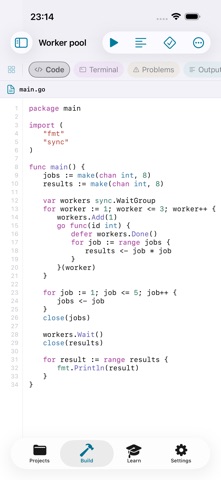
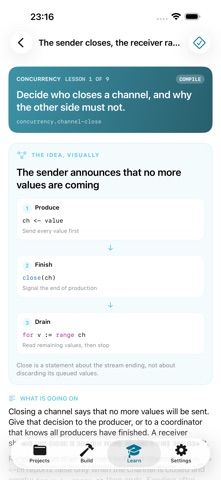
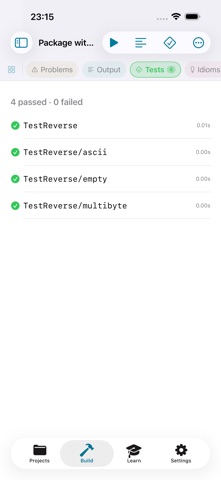
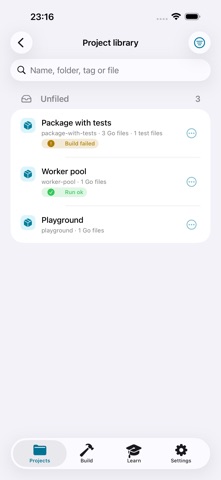
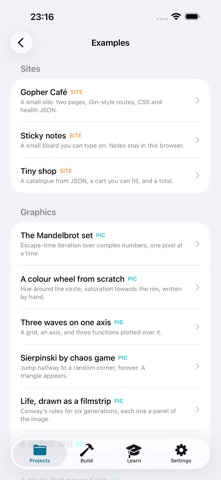
An offline Go compiler and code editor for iPhone and iPad. Write, build, run and test real Go with the bundled Go 1.27.1 compiler, linker, vet and gofmt, directly on your device. CODE AND BUILD • Edit Go and go.mod with syntax highlighting, completion and Go keyboard shortcuts. • Build, Run, Test, Vet and Format; read Go diagnostics at their line and column, and see per-case test results. • Use an app-scoped terminal for project and Go commands. • Organize projects with folders, tags, favorites and search by file name. • Import a public GitHub repository, a folder from Files or an exported archive. • Resolve pure-Go packages through the official proxy and checksum database, then vendor their source for offline builds. LEARN AND PRACTICE • 47 lessons across nine units, plus 22 prediction challenges: core Go, structs, collections, interfaces, errors, concurrency, the standard library, modules and generics. • Every lesson and challenge includes a topic-specific visual guide, practical context, common pitfalls and a link to the official Go reference. • Highlighted examples and inline code. Embedded code scrolls with the lesson; expand code to scroll and edit it in full screen. • Compiler-judged exercises, quizzes, matching drills and a review queue based on your mistakes. • Idiom Coach explains common non-idiomatic patterns; Concurrency Lab runs channel and coordination scenarios. • Runnable examples include PNG graphics and local HTML, CSS and JavaScript previews served on 127.0.0.1. ADAPTS TO YOUR SCREEN On iPad, keep files, code and a result dock visible together. On iPhone, switch full-height workspace panes and collapse or resize Files in landscape. On supported iPhone Duo systems, the workspace follows the fold: Code or Terminal sits above the horizontal hinge while using the touch keyboard; Problems, Output, Tests and Idioms replace the lower keys. Files stays on the left and can be closed. Keyboard helpers appear only with the touch keyboard. Without it, Code and Terminal use the available display height. Projects remains reachable while typing. PRIVACY AND PURCHASE A one-time paid download. No subscription, app account, analytics or advertising trackers. Projects and progress are local. Files stored with a chosen iCloud or other provider follow that provider's syncing behavior. Network requests happen for repository/package imports and external links; local web previews may load remote resources included by your project. LIMITS cgo is not supported. Compiled Go runs in a bounded WebAssembly sandbox with one writable project directory and no network access. The terminal is app-scoped. Website previews use WebKit rather than an unrestricted Go web server. Support: https://gopherforge.app/support Privacy: https://gopherforge.app/privacy Terms: https://gopherforge.app/terms
What's new · 1.1
• iPhone Duo layouts for open, closed and folded postures, with Code or Terminal above the horizontal hinge when using the touch keyboard. • Collapsible Files on the left and reachable Projects controls while typing. • Keyboard and layout fixes, including Terminal-to-Code switching and iPhone landscape. Helpers appear only with touch keys; Code and Terminal reclaim space when the keyboard is hidden. • Visual guides, practical notes and pitfalls for all 47 lessons and 22 prediction challenges. • More consistent highlighting. Embedded lesson code scrolls with the page; expanded code scrolls internally. • Updated screenshots, support, privacy and Terms of Use.
Details