

Easy Tempo: Silent Metronome
Kenichi Ando · Music
Independent analytics for this App Store listing. AppTracker is not affiliated with Kenichi Ando.
Chart standing · US
What changed · US
Listing changes AppTracker has observed for this app in this storefront — new versions, price moves, rating shifts, and store copy.
Version 1.1 — eight more languages The app now speaks German, French, Italian, Spanish, Portuguese, Simplified Chinese, Traditional Chinese and Korean, alongside English and Japanese. It follows the language set on your iPhone, so there is nothing to switch on. Musical terms follow each language: quarter notes become Viertelnoten in German, noires in French, negras in Spanish. The tempo marks stay Italian, as they are on the score. Chinese is handled as two separate languages: Simplified for mainland China and Singapore, Traditional for Taiwan and Hong Kong. Nothing about the metronome itself has changed.
In-app purchases · US
What this app sells inside itself, grouped by kind and priced for this storefront.
Screenshots


About
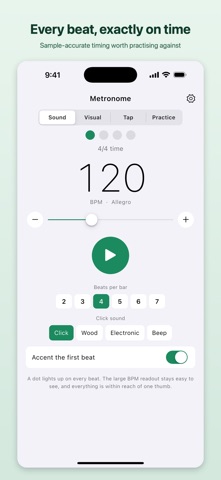
■ A metronome for people who actually practise Not a metronome bolted onto a tuner. Easy Tempo does one thing: it keeps the beat. A beat that drifts makes everything played over it sound muddy, so accuracy came first. Every click is handed to the iOS audio engine ahead of time, at sample resolution, so drawing the screen can never push a beat out of place. On top of that it answers three things other metronomes leave out: keeping time where you cannot make a sound, seeing how steady your own time really is, and practising polyrhythms and odd meters. ■ Free to use 【The metronome itself】 30 to 300 BPM, shown large, moved with a slider or with plus and minus. Two to seven beats to the bar, with the downbeat accent switchable. A row of dots shows which beat you are on, so you can find your place without listening. The Italian tempo mark (Largo, Andante, Allegro) sits under the number, to match the score at a glance. 【Silent visual metronome】 No click at all. The whole screen pulses on the beat, in one of five colours, and the LED on the back can pulse with it, so the beat is still there when the screen is face down. For tuning up with an orchestra, practising at night beside someone asleep, or playing with someone who reads the beat rather than hears it. 【Tap tempo, with a drift meter】 Tap the screen and the average BPM appears. That much is ordinary. What is not ordinary is the second number: the spread between your taps, shown as "±9ms (97% steady)". An average can be right while the gaps wander, and the playing still sounds loose. You cannot feel that spread in yourself; you can only see it once it is a number. Whatever you measured goes straight to the metronome. 【Four click sounds】 Click, Wood, Electronic and Beep, so it cuts through whatever room you are in. (Wood and Beep come with the one-time purchase.) ■ What the one-time purchase opens 【Polyrhythm】 Two pulses at once, such as 3 against 4. One goes left and low, the other right and high, so your ear can hold them apart. Anything from 2 to 9 on either side. 【Offbeat training】 The downbeats stay silent and only the offbeats sound. Eighths or sixteenths. With nothing marking the downbeat, it becomes very clear whether the time is really yours. 【Odd and compound meters】 5/8 as 2+3, or as 3+2. 7/8. Whatever bar you need. Tap a circle and it cycles through strong, weak and rest, so you can lay out an accent pattern without remembering any notation. Subdivide in quarters, eighths or sixteenths. 【Tempo ramp】 Start at a tempo you can actually play and let it climb to your target. You choose how many BPM to add and how many bars to wait. The slow, reliable road to playing something fast, counted out for you. 【Extra click sounds】 Wood and Beep. 【No ads】 The banner at the bottom goes away. One payment. Not a subscription. Restores on any device signed in to the same Apple Account. ■ Also 【Dark mode】 Follows the device setting, so it does not glare in a dim practice room. 【Ten languages】 English, Japanese, German, French, Italian, Spanish, Portuguese, Simplified Chinese, Traditional Chinese and Korean. The app follows the language set on your device. 【iPhone and iPad】 On iPad the controls gather in the middle, within reach of a thumb even on a large screen. 【The screen stays on】 Auto-lock is held off while the metronome runs. Leave it on the music stand. 【No network, ever】 There are no audio files; the click is synthesised as it plays. No account, no sign-in. It works in airplane mode and in a practice room with no signal. ■ Who it is for - Anyone who has been told their time is loose - Anyone working on a piece in an odd meter, or on a polyrhythm - Orchestral and wind players, who often cannot make a sound - Anyone who can only practise late at night - Anyone bringing a fast passage up to speed a few BPM at a time ■ Support Contact: https://tenmais.jp/contact/?lang=en Made by one person. If a time signature or a click sound is missing, please say so.
What's new · 1.1
Version 1.1 — eight more languages The app now speaks German, French, Italian, Spanish, Portuguese, Simplified Chinese, Traditional Chinese and Korean, alongside English and Japanese. It follows the language set on your iPhone, so there is nothing to switch on. Musical terms follow each language: quarter notes become Viertelnoten in German, noires in French, negras in Spanish. The tempo marks stay Italian, as they are on the score. Chinese is handled as two separate languages: Simplified for mainland China and Singapore, Traditional for Taiwan and Hong Kong. Nothing about the metronome itself has changed.
Details