

TraceOff: Remove AI Watermarks
Alice-Georgiana TURCANU · Photo & Video
Independent analytics for this App Store listing. AppTracker is not affiliated with Alice-Georgiana TURCANU.
Chart standing · US
What changed · US
Listing changes AppTracker has observed for this app in this storefront — new versions, price moves, rating shifts, and store copy.
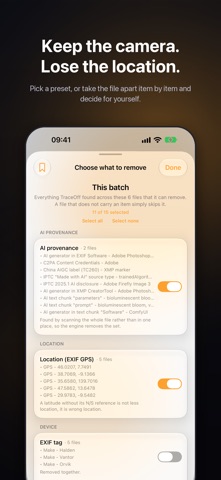
- Now in 17 languages - A redesigned main screen - PDFs, DNG raws and audio files: document information, XMP and container tags come off without touching the content - Word, Excel and PowerPoint documents, plus MP3, WAV, FLAC and AIFF audio: author, properties and tags come off without touching the content - Edit title, caption, creator, copyright and date, or add a location - Custom removal: switch each thing on or off, and save the choice as a preset - Coarsen a location to the city or the neighbourhood instead of removing it - Library audit: count the photos and videos that carry a location or an AI label - Blur faces, text and number plates (Pro) - A "Remove Metadata" action in the share sheet, and a one-tap Clean Clipboard control - Photos captured with motion are cleaned and saved back with their motion intact - Save & Delete Original replaces a photo with its cleaned copy in one step
Screenshots




About
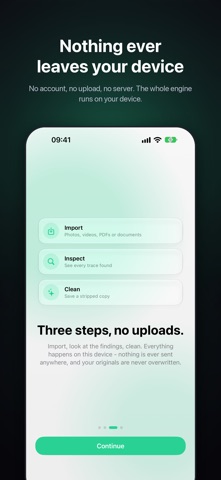
TraceOff removes the hidden data from AI images, photos, videos, audio, PDFs and Office documents: AI labels such as C2PA Content Credentials and "Made with AI", your location, camera serial number, dates and authors. It all runs on your device: no upload, no account. WHAT IS ACTUALLY IN YOUR FILES A picture from your camera roll can carry the exact coordinates where it was taken, the second you took it, your phone or camera's make, model and serial number, your name, and the software you edited it with. Files can also carry provenance records: C2PA Content Credentials, IPTC "Made with AI" labels, China TC260 AIGC tags, or the generator's name. TraceOff reads all of it and shows you what is there, file by file, before it removes a byte. CHOOSE WHAT GOES All metadata. Location, camera make and model, serial numbers, dates, comments, XMP, IPTC records, container tags, video timestamps, audio tags, document properties and authors in PDF and Office files, and any provenance records. Only the display orientation and the colour profile survive. Custom. Switch each thing on or off and save the choice as a preset. A location can also be rounded to the city or the neighbourhood instead of removed. AI provenance only. A narrower mode: removes C2PA Content Credentials, AI labels, TC260 and AI generator tags and AI text chunks. Camera EXIF, colour profile and ordinary text stay. Useful when a real photo was labelled "Made with AI" after a small edit. NOTHING IS RE-ENCODED This is not an export. JPEG, PNG, WebP, GIF, HEIC, AVIF, JPEG XL, TIFF and DNG images, MP4/MOV video, and M4A, MP3, WAV, FLAC and AIFF audio are copied byte for byte; only the metadata is rewritten. Animated GIFs stay animated, photos captured with motion keep their motion. After every clean, TraceOff re-reads the result and tells you if anything survived. MORE THAN METADATA - Audit your photo library: count items with a location or an AI label - Blur faces, text and number plates before you share (the one step that re-encodes) - Edit a file's title, caption, creator, copyright and date, or add a location ("Use my location" asks only when you tap it) - The share sheet, with a "Remove Metadata" action that cleans without opening the app - An automation action, and a one-tap Clean Clipboard control Cleaned copies go to your photo library, the Files app, the share sheet or the clipboard. Originals are never modified unless you choose Save & Delete Original. HONEST ABOUT THE LIMITS TraceOff edits metadata only. It does not remove visible or invisible pixel watermarks such as SynthID, nor anything a server has already recorded. A missing local signal means unknown, not clean, and TraceOff says so. Use TraceOff on content you own or may edit; some platforms and jurisdictions require AI disclosures to stay in place. FREE AND PRO Free: audit your library, and read and clean 1 to 3 images, PDFs or Office documents a day (a random number each day). TraceOff Pro: unlimited cleaning, video and audio, cleaning on import, automatic saving to your photo library, the automation action, Clean Clipboard, blurring and batch reports. Pro is available as a monthly subscription or a yearly subscription, each with a 3-day free trial, or as a one-time Lifetime purchase. The app shows prices in your currency before you buy. Payment is charged to your account at confirmation of purchase. A subscription renews automatically unless it is cancelled at least 24 hours before the end of the current period, and your account is charged for renewal within 24 hours of the end of that period. You can manage or cancel a subscription in your account settings after purchase. Any unused part of a free trial is forfeited when a subscription is purchased. Terms of Use (EULA): https://www.apple.com/legal/internet-services/itunes/dev/stdeula/ Terms of Service: https://sudoswisshub.github.io/TraceOffLegal/terms.html Privacy Policy: https://sudoswisshub.github.io/TraceOffLegal/privacy.html
What's new · 2.0
- Now in 17 languages - A redesigned main screen - PDFs, DNG raws and audio files: document information, XMP and container tags come off without touching the content - Word, Excel and PowerPoint documents, plus MP3, WAV, FLAC and AIFF audio: author, properties and tags come off without touching the content - Edit title, caption, creator, copyright and date, or add a location - Custom removal: switch each thing on or off, and save the choice as a preset - Coarsen a location to the city or the neighbourhood instead of removing it - Library audit: count the photos and videos that carry a location or an AI label - Blur faces, text and number plates (Pro) - A "Remove Metadata" action in the share sheet, and a one-tap Clean Clipboard control - Photos captured with motion are cleaned and saved back with their motion intact - Save & Delete Original replaces a photo with its cleaned copy in one step
Details