

MainframeMonitor
Ralf Langhoff · Utilities
Independent analytics for this App Store listing. AppTracker is not affiliated with Ralf Langhoff.
Chart standing · US
What changed · US
Listing changes AppTracker has observed for this app in this storefront — new versions, price moves, rating shifts, and store copy.
What's New in Version 2.0 The biggest update to the console so far: New Displays • Seismograph: A paper strip chart records vibrations live and rates them from Light to Severe. Choose from three styles: Standard, Fine and Bars. • Front Panel Lamps: One lamp per CPU core, plus NET and MEM. The lamps flicker with actual system load. • Compass Panel with heading tape • Audio Panel: Output device and volume • Display: Brightness and refresh rate (ProMotion 120 Hz) • Network: Shows expensive connections and Low Data Mode • Capacity Planning: Battery and free storage forecast • Session Statistics (SMF): Average and peak CPU and memory usage, data received and sent Live Activity • 3270-style console on the Lock Screen and in the Dynamic Island IBM 1403 Line Printer • Press PF8 PRINT to print a system status report on green-bar continuous paper, complete with printer sounds. You can share the report. New Commands • D ENV: Compass, display, audio, network • D CAPACITY: Battery and storage forecast • D M=MIPS: CPU benchmark compared with historic IBM systems • D SMF: Session records • D IPLINFO: Date of the last restart Usability • PF1: New Operator Guide in English and German • System Control Panel: Configure the screensaver, seismograph style, Live Activity and lamp strip • The Syslog is now off by default, and the panels use the freed space. • Close the Syslog with X or enlarge it with MAX. Commands can be run directly from the full-screen view. • The Change Log now has its own full-screen view. • Minor improvements and bug fixes
Ratings breakdown · US
The star breakdown behind this app's rating in this storefront.
In-app purchases · US
No in-app purchases.
Screenshots




About
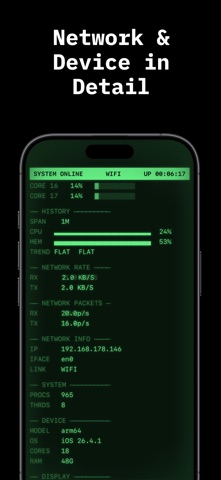
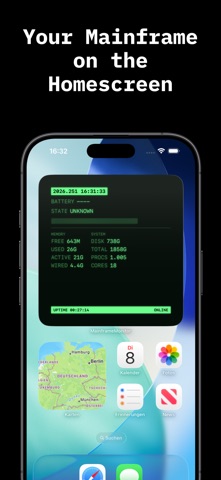
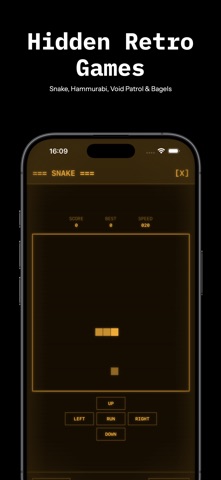
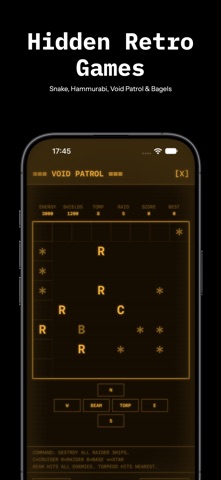
Turn your iPhone into a mainframe from the golden age of computing. MAINFRAME MONITOR shows your device's live stats wrapped in a nostalgic CRT console – complete with phosphor glow, scanlines, a boot sequence and satisfying key clicks. Choose between classic GREEN or warm AMBER, each with its own matching app icon. ■ LIVE SYSTEM MONITOR • Battery, CPU, memory and free storage • Uptime, network status and device info • All in real time, right on the glowing screen ■ HOME SCREEN WIDGET • Keep your key system stats always in view • In the same retro CRT style ■ REAL MAINFRAME FEELING • Authentic boot sequence on launch • Scanlines, glow and CRT effects • Terminal-style PF function-key controls ■ HIDDEN CLASSIC GAMES • Snake, Hamurabi, Void Patrol and Bagels • Text-based retro games, just like on the old terminals ■ FAIR & PRIVATE • Completely free • No ads, no trackers, no accounts • All data stays on your device Whether as a stylish system monitor, a home screen widget or a hands-on piece of computing history – MAINFRAME MONITOR brings back the charm of the old data centers. Made with attention to detail. Be sure to check out my other apps right inside the app.
What's new · 2.0
What's New in Version 2.0 The biggest update to the console so far: New Displays • Seismograph: A paper strip chart records vibrations live and rates them from Light to Severe. Choose from three styles: Standard, Fine and Bars. • Front Panel Lamps: One lamp per CPU core, plus NET and MEM. The lamps flicker with actual system load. • Compass Panel with heading tape • Audio Panel: Output device and volume • Display: Brightness and refresh rate (ProMotion 120 Hz) • Network: Shows expensive connections and Low Data Mode • Capacity Planning: Battery and free storage forecast • Session Statistics (SMF): Average and peak CPU and memory usage, data received and sent Live Activity • 3270-style console on the Lock Screen and in the Dynamic Island IBM 1403 Line Printer • Press PF8 PRINT to print a system status report on green-bar continuous paper, complete with printer sounds. You can share the report. New Commands • D ENV: Compass, display, audio, network • D CAPACITY: Battery and storage forecast • D M=MIPS: CPU benchmark compared with historic IBM systems • D SMF: Session records • D IPLINFO: Date of the last restart Usability • PF1: New Operator Guide in English and German • System Control Panel: Configure the screensaver, seismograph style, Live Activity and lamp strip • The Syslog is now off by default, and the panels use the freed space. • Close the Syslog with X or enlarge it with MAX. Commands can be run directly from the full-screen view. • The Change Log now has its own full-screen view. • Minor improvements and bug fixes
Details