

Sweep: Floor Coverage Map
Mustafa Ergisi · Utilities
Independent analytics for this App Store listing. AppTracker is not affiliated with Mustafa Ergisi.
Chart standing · US
In-app purchases · US
What this app sells inside itself, grouped by kind and priced for this storefront.
Screenshots



About
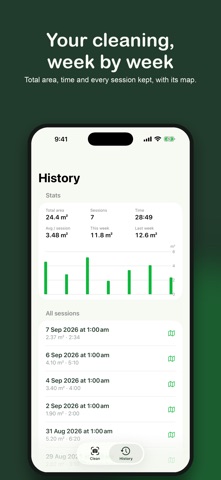
See what you actually cleaned. Point your iPhone at the floor while you vacuum. Sweep follows your vacuum's floor head, paints every strip it covers in green right on your floor, and adds up the area in square metres. When you finish, you get a top-down coverage map of the session. HOW IT WORKS • Hold the phone so the floor head stays in the picture, about a metre ahead of you. • Sweep tracks the head with the camera and LiDAR and draws the trail in augmented reality. • Tap Finish to see the map and the estimated area. ONE-TIME SETUP Show Sweep your floor head once. It remembers it for every future session. Change heads later in Settings. SWEEP PRO (one-time purchase, no subscription) • Every session kept, with its map • Cleaning statistics: total area, time, sessions, this week vs last week • Supports development PRIVATE BY DESIGN Everything runs on your iPhone. No video, photos or depth data are stored or sent anywhere. Only a small appearance reference of the head and your coverage maps are kept on the device. REQUIREMENTS An iPhone with LiDAR (iPhone 12 Pro or any later Pro model) and a stick vacuum with a wide floor head. Coverage is an estimate; it does not measure suction or cleanliness.
What's new · 1.0.3
Three ways to paint the floor while you clean. Pick one under Floor style before a session: • Colour — one sheet of colour, as before. • Squares — the floor becomes a grid of squares that turn greener every time you pass over the same spot. • Picture — a picture hidden under the floor, revealed where you cleaned. You can also share the finished map as an image.
Details