

Film Camera Remote
Johannes Doerr · Photo & Video
Independent analytics for this App Store listing. AppTracker is not affiliated with Johannes Doerr.
Chart standing · US
Screenshots


About
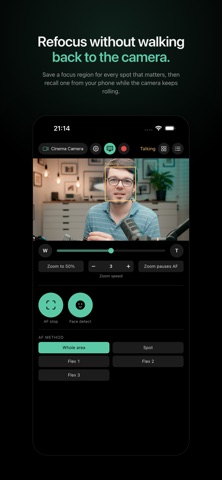
You are the one in front of the camera. Focus is set for where you are standing, and the moment you hold something up — a product, a part, a page — it stays on your face. Walking over to refocus and walking back costs you the take. Film Camera Remote lets you set the focus regions up front instead: one for you, one for whatever you are holding, one for the second chair. Each is saved on a trigger, and moving focus from one to the next takes a tap on your phone, a pad on the desk, or a keyboard shortcut — while the camera keeps rolling. With a power zoom lens, a trigger can bring its own focal length along. It works over Wi-Fi with mirrorless bodies that speak CCAPI and with cinema bodies that speak the XC control protocol. The website lists every camera it has been tested against. BEFORE YOU BUY CCAPI bodies: the protocol is switched off on every camera until you turn it on, and no app can do it for you. It takes a free one-time activation tool from the manufacturer's developer site: register there, run the tool once with the camera connected by USB, and CCAPI appears in the camera's Wi-Fi settings from then on. Until that is done, this app cannot connect to your camera. XC bodies: nothing to activate. Switch the XC protocol on in the camera's own network menu. FOCUS REGIONS AND TRIGGERS A profile remembers one framing: where focus sits, which AF method is active, whether AF and face detection are on, and — with a power zoom lens — the zoom position and how fast to get there. Put it on one of four triggers — A, B, C or D — and that framing is one tap away for the rest of the shoot. • Triggers never move and are always all shown, so you can hit the right one without reading it • The profile name is on the button. Colour is the fast signal, never the only one • Next and previous step through them, skipping empty triggers and wrapping at both ends • On iPhone, each trigger taps back a different count, so you can feel which one fired POWER ZOOM With a power zoom lens on a supported cinema body, the app drives the zoom to a position and stops it there: a fast punch-in for a product, or a slow transition at a speed you choose. Pause AF holds focus and face detection while the lens moves, so the camera never settles on the half-way framing. A fader on a MIDI controller rides the lens directly. THE FOCUS PAD The pad is where you place focus, with the AF frames the camera reports drawn on it, so you can see focus land and a tracked face being followed. By default it shows no picture — you are looking at the lens or a monitor, not down at the phone — but when there is no monitor, the camera's own picture can be switched on under the frames. In landscape the pad is as wide as the sensor. Twice the width means finer control over where focus lands. Portrait puts the controls under the pad instead, for one-handed use. MIDI Fire a profile from a USB or Bluetooth MIDI controller. Learn records whatever your pad actually sends, so there is nothing to reprogram on the controller. A pad fires on press only, never twice on release. ON MAC The same controls, sized for a pointer instead of a thumb. Triggers and profiles live in the sidebar, and every trigger is also on the menu bar and on Command 1 to Command 4, so macOS can rebind them in System Settings. PRIVACY The app talks to your camera on your own network and to nothing else. No account, no analytics, nothing collected.
Details