

ScreenSunset Companion
FLY SKY PTY LTD · Utilities
Independent analytics for this App Store listing. AppTracker is not affiliated with FLY SKY PTY LTD.
Chart standing · US
What changed · US
Listing changes AppTracker has observed for this app in this storefront — new versions, price moves, rating shifts, and store copy.
Reliability fix: a child's device now stays connected to the parent's dashboard while it is in use. Previously it could show as offline for hours until the app was opened.
Screenshots





About
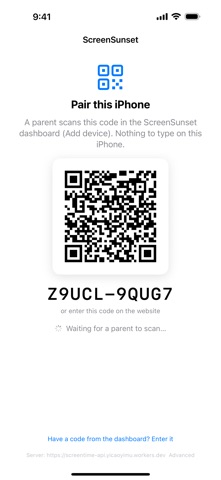
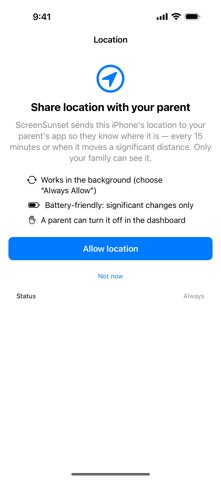
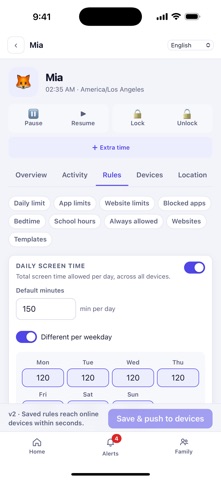
ScreenSunset is one app for the whole family's screen time. Install it on your own iPhone to run the family, and on your child's iPhone or iPad to carry out the rules you set. On first launch it asks who uses the device: - "Me, the parent": the full parent dashboard. - "My child": this device follows the rules a parent sets. - "Both": manage the family and put limits on your own phone too. FOR PARENTS: SEE THE DAY AT A GLANCE - Today's screen time for every child, against the limit you set - Top apps, websites and searches, and which devices are online - 7-day and 30-day trends, with school-hours time counted separately - Alerts for blocked sites, risky searches and devices that stop reporting - An optional AI daily summary in plain language SET THE RULES ONCE - A daily screen-time limit, with a different limit per weekday - Per-app time limits, required breaks and blocked apps - Bedtime and school-hours windows - Website filtering by category, plus always-allow and always-block lists - Ready-made templates for preschool, primary, middle and high school ACT IN THE MOMENT - Pause the internet, lock or unlock a device, or grant 15, 30 or 60 extra minutes - Approve or deny a request for more time, and read the reason your child gave - See each device's last known location, with the past 24 hours as a trail ON YOUR CHILD'S DEVICE 1. Choose "My child". The app shows a QR code; scan it from your dashboard (Add device). 2. Allow Screen Time (Apple's Family Controls) and pick the apps each rule covers. 3. From then on you change the rules from your own phone or computer, and this device applies them within seconds. When an app is paused the block screen offers "Ask for more time", and your child can add a reason. ScreenSunset itself stays open during lock and bedtime, so asking is always possible. The child cannot change the rules; sensitive actions, including the parent dashboard on a child's device, need the parent's PIN. THE WEBSITE FILTER STAYS ON THE DEVICE On a child's device ScreenSunset installs a local VPN profile. It is a DNS-only filter that runs entirely on the device: it looks at website names to decide whether a site is allowed, and never proxies, records or forwards browsing traffic through our servers. A parent-only device never asks for Screen Time or VPN access. WHAT IS COLLECTED A child's device reports coarse app-usage totals, the website domains visited and its location to the family's own ScreenSunset account, so the parents can see them. Nothing is sold or shared, there are no ads and no third-party analytics or advertising SDKs. Deleting your account in the app deletes your family's data. WORKS ACROSS DEVICES Sign in with email, Apple or Google. FREE AND PREMIUM Free: one child, one device, 7 days of history and every protection feature. ScreenSunset Premium (monthly or yearly auto-renewing subscription) adds unlimited children and devices, 90 days of history, location and AI daily summaries. Payment is charged to your Apple ID and renews automatically unless cancelled at least 24 hours before the end of the period; manage it in your App Store account settings. Terms of Use (EULA): https://www.apple.com/legal/internet-services/itunes/dev/stdeula/ Support: https://screensunset.com/support Privacy Policy: https://screensunset.com/privacy
What's new · 1.1.1
Reliability fix: a child's device now stays connected to the parent's dashboard while it is in use. Previously it could show as offline for hours until the app was opened.
Details