

Fipsta
Coolblack GmbH · Photo & Video
Independent analytics for this App Store listing. AppTracker is not affiliated with Coolblack GmbH.
Chart standing · US
What changed · US
Listing changes AppTracker has observed for this app in this storefront — new versions, price moves, rating shifts, and store copy.
• Your screen and you in a circle: with the free Mac app “Fipsta Recorder”, record a website, app or ChatGPT with sound, voice and your face. Import it under “Screen recording via Mac” – Fipsta adds your face automatically as picture in picture. • Fast motion and slow motion for single sections: add 2×, 5×, 10× or 20× or ½× right in the timeline and move it with your finger. Fast sections are silent while music and picture in picture keep running – “Sound on” brings the sound back. • Longer videos: edit up to 30 minutes. Automatic editing still suggests short videos. • Select and delete several subtitles at once – with undo. • Margin for platforms: screen recordings stay fully visible even when Instagram & Co. crop the sides. • Mute a selfie instead of deleting it: your face stays in the video. • Picture in picture ends cleanly when the camera image is shorter than the voice.
In-app purchases · US
What this app sells inside itself, grouped by kind and priced for this storefront.
Screenshots






About
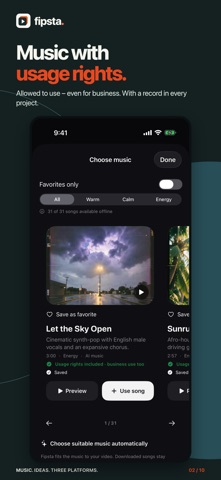
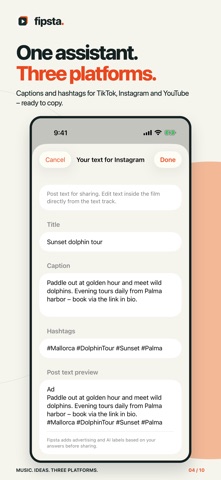
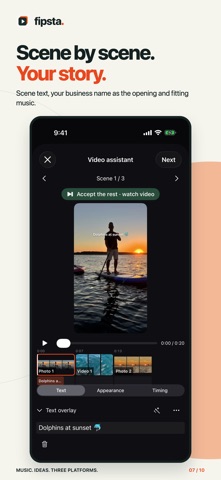
Ideas in. Video out. Fipsta is the fast way to short videos for businesses, freelancers and anyone who doesn't want to spend an hour editing. Three things make Fipsta different: 1. MUSIC WITH USAGE RIGHTS No license hunting, no guesswork: you may use the Fipsta music library in your videos – including for business and for paid promotion of those videos. Every track keeps its usage record in the project. No extra account needed. 2. FROM IDEA TO VIDEO Type or say one sentence about your video. Fipsta tidies up your text, suggests three versions and shows what's still missing: name, place, what makes it special. Together with your photos and videos, that becomes a shot plan, scene text, an opening with your business name and fitting music – scene by scene, the way you want it. 3. ONE ASSISTANT FOR TIKTOK, INSTAGRAM AND YOUTUBE The assistant guides you step by step to a finished video for all three platforms: separate captions and hashtags to copy, reach tips per platform and a rights check that thinks of ad labels, AI notices and people's rights. Fipsta never posts automatically. EXPORT PRESETS FOR YOUR CHANNELS The same video in the right size for WhatsApp, LinkedIn, Instagram post, Facebook, YouTube landscape, your Google Business Profile, your website or by email. Fipsta frames the picture around the subject. YOUR SCREEN AND YOU IN A CIRCLE Show your website, app or ChatGPT – and yourself as a circle next to it. Record on a Mac with the free app “Fipsta Recorder”, with the app’s sound, your voice and your face. AirDrop it to your iPhone and import it into Fipsta: screen and face arrive separately, so circle, sound and voice stay editable. EDIT LIKE A PRO – JUST SIMPLER Picture, text, effects and music sit clearly in one timeline. Move, trim and extend with your finger, pinch to zoom into the picture. Place captions and your own text, narrate or re-record a passage, picture in picture. FAST MOTION AND SLOW MOTION – WITH SOUND YOUR WAY Long passages in fast motion from 2× to 20×, great moments in slow motion – add them right in the timeline and move them with your finger. In fast motion the voice goes quiet automatically while music and picture in picture keep running; “Sound on” brings it back. Videos up to 30 minutes. EFFECTS THAT LOOK LIKE CINEMA Film look, light leak, cinema bars, spotlight, magnifier, strobe, portrait blur, person in color – each with its own sliders. Spatial 3D photos with a camera move or your own finger movement. Blur faces and number plates – tracked if you like. YOUR MEDIA STAYS WITH YOU No Fipsta account, no advertising or analytics SDKs. Videos, photos, dictation and AI inputs are processed on your device. Music, covers, the guide and settings download over HTTPS when needed. START FREE All features for 14 days from first launch – without starting a subscription or any automatic charge. After that, Fipsta stays free to use: create, edit and export videos with no limit on exports – with 5 music tracks and 3 AI text-suggestion requests a day per device. Your videos stay free of any Fipsta mark; only captions get the removable line “Made with Fipsta #fipsta”. The annual subscription offers all music tracks, AI text suggestions without a daily limit and captions without the Fipsta line. Apple shows the price for the full year before purchase. Your paid year starts only when you confirm and renews annually until canceled. Requires iOS/iPadOS 26 or later. AI suggestions need a compatible device with Apple Intelligence enabled; recording, editing, music, rights and reach checks and export work without it. English and German. The rights and reach checks are guidance, not legal advice and no guarantee of reach. Privacy: https://fipsta.com/datenschutz/#english Terms: https://fipsta.com/nutzung/#english Apple standard EULA: https://www.apple.com/legal/internet-services/itunes/dev/stdeula/
What's new · 1.5.0
• Your screen and you in a circle: with the free Mac app “Fipsta Recorder”, record a website, app or ChatGPT with sound, voice and your face. Import it under “Screen recording via Mac” – Fipsta adds your face automatically as picture in picture. • Fast motion and slow motion for single sections: add 2×, 5×, 10× or 20× or ½× right in the timeline and move it with your finger. Fast sections are silent while music and picture in picture keep running – “Sound on” brings the sound back. • Longer videos: edit up to 30 minutes. Automatic editing still suggests short videos. • Select and delete several subtitles at once – with undo. • Margin for platforms: screen recordings stay fully visible even when Instagram & Co. crop the sides. • Mute a selfie instead of deleting it: your face stays in the video. • Picture in picture ends cleanly when the camera image is shorter than the voice.
Details