

L & N: Speech Practice
LazyingArt LLC · Education
Independent analytics for this App Store listing. AppTracker is not affiliated with LazyingArt LLC.
Chart standing · US
What changed · US
Listing changes AppTracker has observed for this app in this storefront — new versions, price moves, rating shifts, and store copy.
Practice controls stay in place while recording, scoring and trying again, with changing feedback below them. Saved recordings are more resilient, with clearer storage warnings and smaller replay files when beneficial. Existing recordings are preserved. In Listen, hold a word pair to repeat it continuously, then tap Stop. Playing indicators no longer move the results. Update without uninstalling to keep your practice history.
Screenshots





About
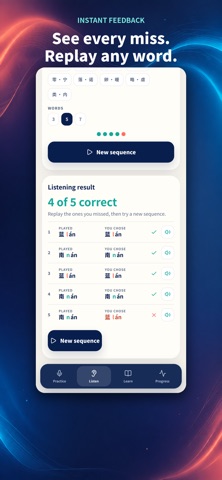
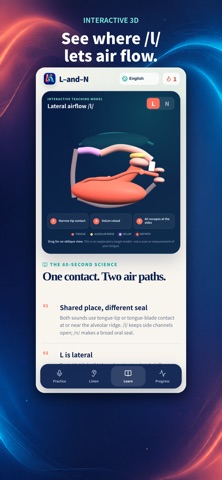
Do light and night sound too similar? L & N gives you a small place to practise the difference, one pair at a time. START BY LISTENING Choose a pair and a round of 3, 5 or 7 words. Tap what you heard in order, then check each answer. Hear the two words again before trying another round. TRY SAYING IT Listen to the model, record one word and see what the recognizer heard. The feedback shows the sound cues behind the result, with a waveform to help you spot silence or recording problems. HEAR YOUR OWN PROGRESS Replay a saved take on its own or after the model. Your practice history stays on your device, so you can return to earlier attempts. Available storage still matters; clearing app data removes saved takes. THREE PRACTICE LANGUAGES Practise English, Mandarin or Cantonese. Choose your interface separately: English, Simplified Chinese, Traditional Chinese or Cantonese. Explore a 3D mouth cutaway for tongue placement and airflow, or use the compact Apple Watch listening drill. Audio examples use synthetic voices. No account, ads or advertising trackers. Speech recognition uses Apple's speech services; whether it runs locally depends on the device and its settings. L & N is a practice tool, not a clinical assessment. The feedback and mouth model help you explore a sound; they do not measure or diagnose your speech.
What's new · 1.0.9
Practice controls stay in place while recording, scoring and trying again, with changing feedback below them. Saved recordings are more resilient, with clearer storage warnings and smaller replay files when beneficial. Existing recordings are preserved. In Listen, hold a word pair to repeat it continuously, then tap Stop. Playing indicators no longer move the results. Update without uninstalling to keep your practice history.
Details