

Timestamp Camera Gps Timemark
Farouk Nasser · Photo & Video
Independent analytics for this App Store listing. AppTracker is not affiliated with Farouk Nasser.
Chart standing · US
Screenshots






About
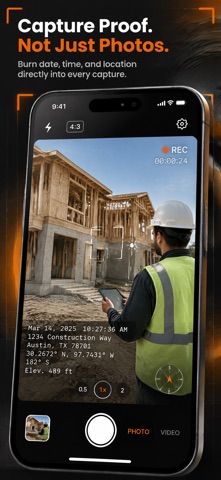
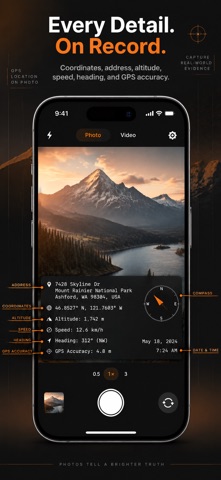
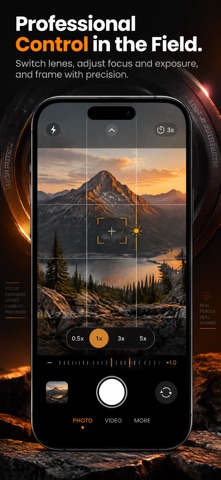
Time Stamps Camera is the native timestamp and GPS camera built for site inspections, field work, delivery proof, construction records, and travel logs. Capture photos and videos with dates, times, street addresses, GPS coordinates, compass headings, altitude, and map snapshots burned directly into the exported media. When media must serve as proof, metadata sidecars and EXIF tags cannot be relied upon—messaging apps and cloud platforms frequently strip them. Time Stamps Camera permanently burns your location and time data directly into the exported pixels, ensuring your records remain verified, tamper-evident, and permanent. IDENTICAL PREVIEW & PIXEL-PERFECT EXPORTS Unlike apps where on-screen previews drift from saved media, Time Stamps Camera uses a single unified rendering pipeline: • Full Sensor Resolution: Photos are composited at full camera resolution from decoded sensor pixels—never screenshotted. • Real-Time Video Stamping: Video frames pass through a Metal Core Image pipeline directly into the recorder with zero export delay. • Live Ticking Clock: The timestamp in your video recording advances second by second in real time while filming. COMPREHENSIVE STAMP DATA Switch any data field on or off independently: • Date & Time: 10 date formats (ISO 8601, numeric, short, long), uppercase styling, 12/24-hour clock, live seconds, and custom separators. • Time Zones: Automatic local time zone or lock to any custom global time zone. • Street Address: Street, city, state/region, postal code, and country resolved on-device via Apple geocoding. • Precision Coordinates: Decimal Degrees, DMS, Degrees/Decimal Minutes, and Signed Decimal with 2 to 8 decimal places. • Telemetry Metrics: Altitude (m/ft), speed (km/h, mph, m/s, knots), compass heading, and GPS accuracy. • Mini Map Snapshot: Map tile (Standard, Satellite, Hybrid) with adjustable zoom span and pinpoint marker. • Custom Notes: Up to 6 lines of custom text for project names, inspector IDs, or job codes. • Logo Watermark: Import company logos from your photo library with custom size, opacity, and positioning. CUSTOM DESIGN & POSITIONING • 12 Typefaces: System, Rounded, Serif, Mono, Condensed, Avenir Next, Helvetica Neue, Georgia, Courier New, Menlo, Futura, and Copperplate. • Typography Control: 5 weights, preset sizes, custom sizing slider, colors, and drop shadows. • Background Plate: Solid, translucent, or transparent backgrounds with corner radius and padding controls. • 9 Anchors & Free Drag: Snap to 9 frame anchors or freely drag the stamp across the viewfinder. • Normalized Coordinates: Layouts adapt automatically across 4:3 photos, 16:9 videos, and 1:1 framing. PROJECTS, PRESETS & GALLERY • Project Folders: File captures under specific jobs, clients, or properties. • Project Defaults: Apply designated stamp presets automatically when a project is active. • 7 Built-In Presets: Minimal, Date & Time, Location, GPS, Work, Travel, and Map. • Custom Presets: Save, duplicate, rename, and manage reusable stamp layouts. • In-App Gallery: Review captures with frozen metadata, map views, and notes. Filter by photo, video, or project. • Storage Options: Save to Photos, export to a dedicated album, or keep in-app copies. PRO CAMERA CONTROLS • Multi-Lens Switching: Hardware optical buttons (0.5x, 1x, 3x, 5x) plus pinch-to-zoom and slider. • Focus & Exposure: Manual tap-to-focus and exposure target bias. • Lighting & Shutter: Flash modes (Auto, On, Off), video torch, self-timer (3s, 5s, 10s), and tap-to-capture. • Framing Grids: Rule of Thirds, 4x4, Golden Ratio, and Crosshair. • Video & Formats: 720p, 1080p, and 4K with stabilization. Export in JPEG or HEIF. ON-DEVICE PRIVACY • Zero tracking, no third-party analytics, and no external servers. • 3 GPS Policies: Never attach GPS, visible stamp only (no hidden EXIF tags), or visible stamp plus EXIF metadata. EULA: https://www.apple.com/legal/internet-services/itunes/dev/stdeula/
Details