

MilliPrint – Exact Size Print
Junmo Lee · Photo & Video
Independent analytics for this App Store listing. AppTracker is not affiliated with Junmo Lee.
Chart standing · US
What changed · US
Listing changes AppTracker has observed for this app in this storefront — new versions, price moves, rating shifts, and store copy.
Updated the links to our support page and privacy policy.
In-app purchases · US
What this app sells inside itself, grouped by kind and priced for this storefront.
Screenshots



About
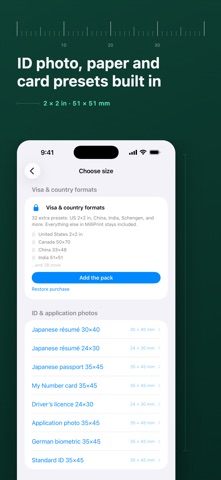
MilliPrint prints images at the exact size you ask for. Not "fits the page" — the size you typed, in millimetres, on paper. EXACT SIZE, NOT "FIT TO PAGE" Printers quietly shrink your page to their printable area, and that is what ruins a 35 × 45 mm photo. MilliPrint renders every page at true paper size and hands it to the printer that way. CALIBRATE YOUR PRINTER ONCE Print the ruler sheet, measure the two lines with any ruler, type in what you measured. From then on MilliPrint corrects every print for your printer. Save a profile for each printer you use. If your printer is already exact, MilliPrint records that too — and stays out of the way. SIZE PRESETS THAT ARE ALREADY THERE · ID and application photos — Japanese résumé 30 × 40, passport 35 × 45, German Bewerbungsfoto 35 × 45 · Paper at actual size — A4, A5, A6, B5, B6, Letter, L, 2L, KG, postcard · Cards — business cards and ID-1 · Any custom size in millimetres or inches FILL THE SHEET Set how many copies you want and MilliPrint packs them onto the sheet with cut marks. PRINT OR PDF Print over AirPrint or save a PDF at exact dimensions. Both are free. FACE GUIDE FOR ID PHOTOS The app finds the face and suggests a starting crop, with a dotted guide for head position. It is a positioning aid — always check the current requirements of the office you are applying to. NO ACCOUNT, NO SERVER No account. No analytics. No servers. Your images never leave your device. FREE, AND TWO OPTIONAL PACKS Everything above is free: all ID and card formats, cropping, sheet layout, cut marks, printing, PDF, and printer calibration. Two one-time purchases, no subscription: · Visa & Country Formats — 32 more presets (United States 2 × 2 in, China, India, Schengen and more) · Pro Tools — print larger than one sheet (posters, life-size panels, full-scale patterns) and export each sheet as a 300 dpi JPEG Nothing you unlock is ever locked again. If you bought MilliPrint when it was a paid app, both packs are already yours.
What's new · 1.2.1
Updated the links to our support page and privacy policy.
Details