

GigaSweep: Bulk Photo Cleanup
Kensuke Hoshikawa · Utilities
Independent analytics for this App Store listing. AppTracker is not affiliated with Kensuke Hoshikawa.
Chart standing · US
What changed · US
Listing changes AppTracker has observed for this app in this storefront — new versions, price moves, rating shifts, and store copy.
Ads now appear as a banner at the bottom of the home screen. Ads are not shown on photo selection or deletion screens.
In-app purchases · US
What this app sells inside itself, grouped by kind and priced for this storefront.
Screenshots


About
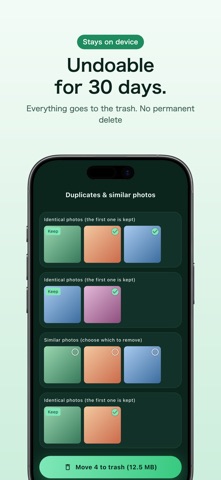
Out of storage, but deleting photos one by one never ends? GigaSweep finds screenshots, duplicate photos and large videos, and moves them to the trash in bulk. ■ Finds what can go, in piles - Screenshots - Screen recordings - Large videos (100MB+, biggest first) - Duplicate & similar photos Scan your library and see how many gigabytes you can free — before deleting anything. ■ You always see before you sweep Every pile shows thumbnails, and you choose what goes. Similar photos are never pre-selected, so a burst's best shot is never deleted by surprise. ■ Everything is undoable for 30 days Deletions go to the system trash ("Recently Deleted"). There is no permanent delete in this app. Restore anything from the Photos app within 30 days. ■ Your photos never leave your device All processing happens on-device. No uploads, no account, no sign-in. ■ Pricing Free: sweep up to 10 items at a time. One-time purchase removes the limit and the ads. No subscription.
What's new · 1.0.5
Ads now appear as a banner at the bottom of the home screen. Ads are not shown on photo selection or deletion screens.
Details