

Telkino: VNC Remote Desktop
Alexander Manzer · Utilities
Independent analytics for this App Store listing. AppTracker is not affiliated with Alexander Manzer.
Chart standing · US
What changed · US
Listing changes AppTracker has observed for this app in this storefront — new versions, price moves, rating shifts, and store copy.
Telkino is ready for iPhone Duo. • Laptop mode: stand iPhone Duo up like a laptop during a session, and Telkino goes full screen, with your Mac on top and the keys and a trackpad below • On the trackpad, one finger moves the pointer and taps to click, double-tap and hold drags, two fingers scroll, and a two-finger tap right-clicks, with haptic feedback • Type with the keyboard below while your Mac stays in view above • The start screen now fits smaller displays • Small fixes Questions or feedback: support@telkino.app
Screenshots



About
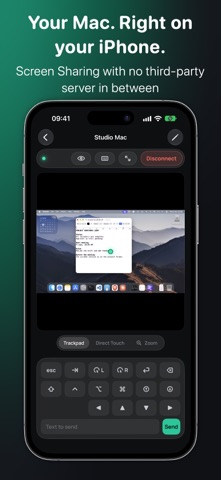
Telkino shows the screen of your Mac or Windows PC on iPhone and iPad and lets you control it. The connection runs directly over your own network or VPN. There is no server in between, no account and no cloud. DIRECT AND PRIVATE • Speaks the open VNC protocol directly with your computer • No account, no backend, no cloud sync • No tracking, no ads, no analytics SDKs • Profiles stay on the device, passwords only in the Keychain FOR MAC AND WINDOWS • Mac: turn on Screen Sharing in System Settings, done • Windows: with a VNC server such as TightVNC, UltraVNC or RealVNC • Finds Macs on the local network via Bonjour and fills in name, address and port • Away from home over VPN, for example Tailscale or WireGuard INPUT • Trackpad mode or direct touch • Pinch zoom, full screen and a key dock with Cmd, Option, Control, Shift, Esc, Tab, arrows and scrolling • Left and right click, send typed text to the computer • Press and hold by touch: rest your finger in Direct Touch, double-tap and hold in Trackpad mode • Image quality per computer: Best, Balanced or Data Saver • Apple High Performance: Macs stream as HEVC video at a resolution that fits your device, with automatic fallback to VNC • iPad: computer list on the left, session on the right • iPad with mouse, trackpad, and hardware keyboard: typing goes straight into the session, click, drag, right click and shortcuts; scrolling arrives precisely on Macs • Shortcuts and Siri: “Connect to a computer” opens the session directly • Data usage of the current session in the status bar • Import computers from Tailscale with a Shortcut (telkino://add link) WAKE ON LAN (PRO) • Wakes a sleeping Mac or PC on the same network before connecting • Needs the MAC address in the profile and, on the Mac, “Wake for network access” DEMO COMPUTER Try everything without a network. The demo computer runs locally in the app and says so. PRICE Your first computer is free forever. Telkino Pro is a one-time purchase without subscription, with unlimited profiles, clipboard sync and Wake on LAN. Family Sharing included. SECURITY VNC is not encrypted by itself. Use a trusted LAN or a VPN. Telkino stops sessions when a server asks for no authentication and never recommends exposing port 5900 to the internet. THE NAME Telkino recalls the “Telekino” of Leonardo Torres Quevedo, the world’s first radio remote control (1903).
What's new · 1.2.1
Telkino is ready for iPhone Duo. • Laptop mode: stand iPhone Duo up like a laptop during a session, and Telkino goes full screen, with your Mac on top and the keys and a trackpad below • On the trackpad, one finger moves the pointer and taps to click, double-tap and hold drags, two fingers scroll, and a two-finger tap right-clicks, with haptic feedback • Type with the keyboard below while your Mac stays in view above • The start screen now fits smaller displays • Small fixes Questions or feedback: support@telkino.app
Details