

EarTimer
Tomokazu Shinozaki · Utilities
Independent analytics for this App Store listing. AppTracker is not affiliated with Tomokazu Shinozaki.
Chart standing · US
What changed · US
Listing changes AppTracker has observed for this app in this storefront — new versions, price moves, rating shifts, and store copy.
EarTimer is now free to download. A non-personalized banner ad appears on the Timer screen and can be removed with a one-time in-app purchase. Existing customers who purchased EarTimer before the switch to free keep an ad-free experience. This update also adds purchase restoration and advertising privacy controls.
In-app purchases · US
What this app sells inside itself, grouped by kind and priced for this storefront.
Screenshots

Similar apps
Competitors and close alternatives, as estimated by AppTracker.
 Announcement Useful Timer PRO
Katagiri Kikaku Corporation
Announcement Useful Timer PRO
Katagiri Kikaku Corporation
 Earphone only alarm
SHUNJI KUSAKA
Earphone only alarm
SHUNJI KUSAKA
 Round Timer
Plain and Simple Software
Round Timer
Plain and Simple Software
 Repeating Beep
Samuel Devaney
Repeating Beep
Samuel Devaney
 Kitchen Timer+ Voice Control
Springboard Inc.
Kitchen Timer+ Voice Control
Springboard Inc.
 Night Timer
Valentins Vlass
Night Timer
Valentins Vlass
 RoundTimer: Interval Timer
Tal Shtark
RoundTimer: Interval Timer
Tal Shtark
 UltraTimer
Plain and Simple Software
UltraTimer
Plain and Simple Software
About
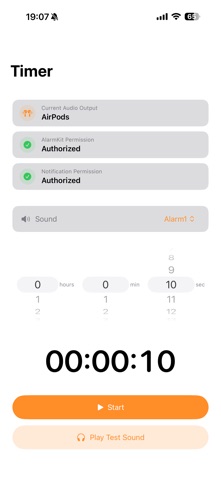
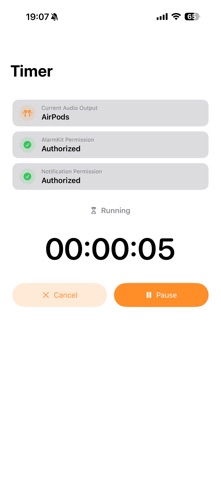
Timer alerts, just for your ears. EarTimer is a timer app for iPhone that plays timer sounds through connected Bluetooth earphones. It is designed for situations where you do not want sound to play through your iPhone’s built-in speaker. Made for moments like these • Early starts while your family sleeps • Quick naps beside a sleeping baby • Mornings in hotels and shared rooms • Naps on trains and planes • Quiet breaks in libraries and shared spaces Key Features • Set timers in hours, minutes, and seconds • Two timer sounds • Test external-audio playback before starting; when no external output is connected, the test uses vibration instead • Pause, resume, or cancel a running timer • On supported devices, control the timer from Live Activities on the Lock Screen or Dynamic Island Free with optional ad removal EarTimer is free to download and includes a non-personalized banner ad on the Timer screen. A one-time “Remove Ads” in-app purchase removes the banner. Existing customers who purchased EarTimer before it became free continue to use the app without ads. Earphone-first playback EarTimer plays the selected timer sound only while an external audio output is connected. If your earphones disconnect, the app will not switch the timer sound to the iPhone’s built-in speaker. Important Information For reliable playback through your earphones, do not force-quit EarTimer. Audio may be interrupted by phone calls, Siri, other audio apps, Bluetooth reconnection, device restarts, or iOS system conditions. Requires an iPhone running iOS 26.0 or later.
What's new · 1.1
EarTimer is now free to download. A non-personalized banner ad appears on the Timer screen and can be removed with a one-time in-app purchase. Existing customers who purchased EarTimer before the switch to free keep an ad-free experience. This update also adds purchase restoration and advertising privacy controls.
Details