

Decibly: Decibel Sound Meter
Denys Khomenko · Utilities
Independent analytics for this App Store listing. AppTracker is not affiliated with Denys Khomenko.
Chart standing · US
What changed · US
Listing changes AppTracker has observed for this app in this storefront — new versions, price moves, rating shifts, and store copy.
Minor fixes. “Rate Decibly” in Settings now opens the App Store review page.
Price & rating history · US
Reconstructed from the listing changes AppTracker has observed in this storefront. A field is charted once it has changed more than once, and each line starts at the value it moved from.
Price · 0.29 USD now · 2 changes on record
In-app purchases · US
No in-app purchases.
Screenshots



Similar apps
Competitors and close alternatives, as estimated by AppTracker.
 dB Meter: Sound Level
Birkan Aksoy
dB Meter: Sound Level
Birkan Aksoy
 Decibel X:dB Sound Level Meter
SkyPaw Co., Limited
Decibel X:dB Sound Level Meter
SkyPaw Co., Limited
 Decibel Meter Plus Pro
Huafang Zhang
Decibel Meter Plus Pro
Huafang Zhang
 Decibel Meter Sonolab: dB SPL
MIGUEL COZAIN
Decibel Meter Sonolab: dB SPL
MIGUEL COZAIN
 Decibels Sound Level Meter
NAICAI LI
Decibels Sound Level Meter
NAICAI LI
 Decibel X PRO: dBA Noise Meter
SkyPaw Co., Limited
Decibel X PRO: dBA Noise Meter
SkyPaw Co., Limited
 dB Meter — Sound Level
Skelpo GmbH
dB Meter — Sound Level
Skelpo GmbH
 Decibel Meter Plus
Huafang Zhang
Decibel Meter Plus
Huafang Zhang
About
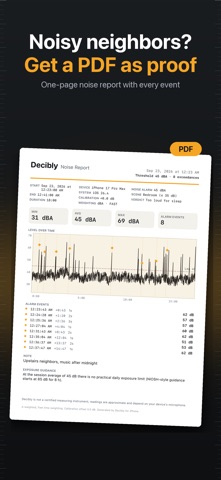
Decibly turns your iPhone into a sound level meter that looks and feels like a real instrument: a large analog gauge with an amber needle, the live reading in crisp numerals, and color zones for quiet, moderate and loud. MEASURE • Live A-weighted decibel reading (dBA), updated 20 times a second • Min, average (Leq) and max for the running session • Scrolling chart of the last 60 seconds • Reference points: 30 whisper · 60 conversation · 80 traffic · 100 danger KEEP THE PROOF • Start/Stop sessions with time, duration, min / avg / max and an optional note ("neighbors drilling", "night shift, hall 3") • History with mini stats and a full chart for every session • Export any session as a one-page PDF report or a CSV file UNDERSTAND • Exposure indicator with NIOSH-style guidance computed from the session average (e.g. about 8 h at 85 dB, about 15 min at 100 dB) — informational only • Calibration slider (−15 … +15 dB) to match a reference meter LIVE, EVERYWHERE • Live Activity: the current level, zone color and elapsed time in the Dynamic Island and on the Lock Screen while a session runs • Lock Screen "Measure" widget that starts a session with one tap; Home Screen widget with your last peak NOISE ALARM & SCENES • Set a threshold (default 70 dBA) — every excursion gets a haptic pulse and is logged with time and peak • Scenes: Baby room ≤ 40, Bedroom ≤ 35, Office ≤ 55, Street, Concert — one tap sets the alarm and gives a verdict such as "OK for sleep" or "Too loud" • "Sounds like…" under the readout: whisper, quiet library, rain, conversation, vacuum cleaner, city traffic, lawn mower, motorcycle, concert, siren EVIDENCE REPORT • One-page Noise Report PDF with device model, iOS version, calibration, start/end, min / avg / max, the strip chart with alarm markers, every event and your note • Shareable summary card image with the peak, date and note PRIVATE BY DESIGN • Audio is never recorded, stored or transmitted — the microphone signal becomes a number and is discarded instantly • No accounts, no analytics, no ads, no location, no network • Everything stays on your iPhone PAY ONCE • Every feature is included. No subscriptions, no in-app purchases, no "Pro" version. Also: two alternate app icons, 8 languages, light and dark theme. Decibly is not a certified measuring instrument; readings are approximate and depend on your device's microphone. The exposure indicator is general guidance, not medical advice.
What's new · 1.2.1
Minor fixes. “Rate Decibly” in Settings now opens the App Store review page.
Details