

Slimsend: Video Compressor
YOTEZIC LTD · Photo & Video
Independent analytics for this App Store listing. AppTracker is not affiliated with YOTEZIC LTD.
Chart standing · US
What changed · US
Listing changes AppTracker has observed for this app in this storefront — new versions, price moves, rating shifts, and store copy.
Choose how much to compress — High quality, Balanced, Small or Smallest — and see each one's size before you start. Size limits for email, Discord and WhatsApp are still one tap away, and a limit that can't be met is flagged before compressing, not after. Plus a progress bar with time left.
Screenshots




About
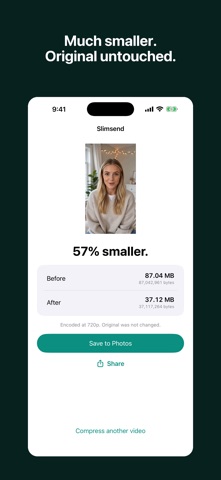
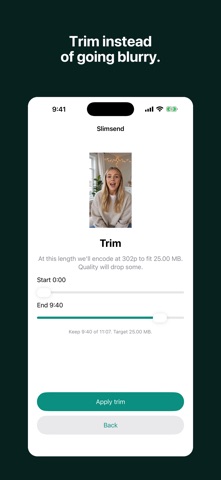
Slimsend makes a video smaller. You pick how small; it works out the rest. Pick a video, then a compression level — High quality, Balanced, Small or Smallest. Each one shows the size it will make before you start. Need it under a limit instead? Pick email, Discord, WhatsApp, or a size you type in, and Slimsend solves for the resolution and bitrate that land under that ceiling. There is no resolution dropdown to guess at. That guess is the app's job, not yours. MEGABYTES THE WAY THE LIMIT MEANS THEM A 25 MB email limit means 25,000,000 bytes. Aim at 26,214,400 instead — which is what "25 MB" means to a lot of software — and the file goes over and the send fails. Slimsend works in decimal bytes from end to end. Under the limit means under the limit. IT TELLS YOU BEFORE, NOT AFTER A ten-minute video inside a 25 MB email is 360p. That is arithmetic, not a bug, and no app can talk its way out of it. Most warn you and carry on, and you find out when you watch it back. Slimsend says so first — and offers the alternative: trim to a length that fits at a higher resolution, or carry on at 360p. Your call, made before the encode instead of discovered after it. IT REFUSES WHEN IT SHOULD • Already under the limit — there is nothing to gain, so it says so instead of re-encoding your video for no reason • So close to the limit that re-encoding would cost quality and could make the file larger • Impossible — when the limit is below the smallest this video can become, it tells you that size before compressing, not after YOUR ORIGINAL IS NEVER TOUCHED The compressed copy is saved separately, to its own album, with the creation date and location intact. The original stays exactly as it was. EVERYTHING HAPPENS ON YOUR IPHONE No account. No upload. No server. No ads — not before the compress, not after it, not anywhere in the app. Nothing to close and nothing to wait for. Free.
What's new · 1.0.2
Choose how much to compress — High quality, Balanced, Small or Smallest — and see each one's size before you start. Size limits for email, Discord and WhatsApp are still one tap away, and a limit that can't be met is flagged before compressing, not after. Plus a progress bar with time left.
Details