

Headtable: Seating Chart
Evatech Innovations,TOO · Lifestyle
Independent analytics for this App Store listing. AppTracker is not affiliated with Evatech Innovations,TOO.
Chart standing · US
What changed · US
Listing changes AppTracker has observed for this app in this storefront — new versions, price moves, rating shifts, and store copy.
What's new in 1.4 • Plan together: invite your partner, a parent or your planner to edit the same plan from their own phone — even on a different Apple Account. Up to four people; changes appear in seconds. Inviting needs Pro, joining is free. • Send each guest their seat in a personal text or email. • Mix up the seats: a fresh random mix for dinner parties that still keeps couples and families together. • Plan the room to scale: enter its size and see which tables sit too close. • Long banquet tables up to 60 chairs, chairs on one side only, and joining two tables into one. • Seven print designs for the whole print pack (Pro). • Day-of check-in: tick guests off at the door. • Optional reminders, so a plan made over several evenings gets finished. • After you paste a list, one tap seats everyone; with no list yet, you can lay out the room first. • A new "How Headtable works" page in Settings, and many small fixes. Headtable is made by one person — if it helps, a rating helps other couples find it.
Screenshots




About
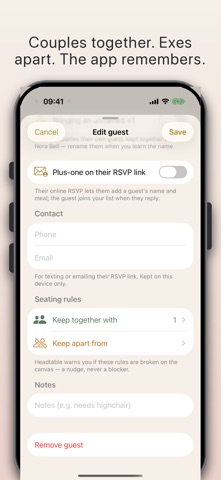
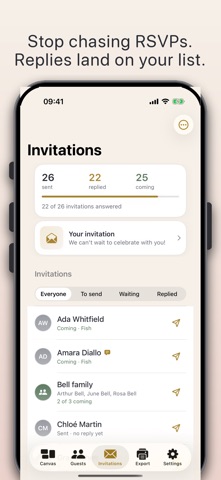
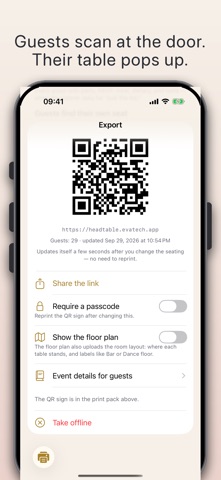
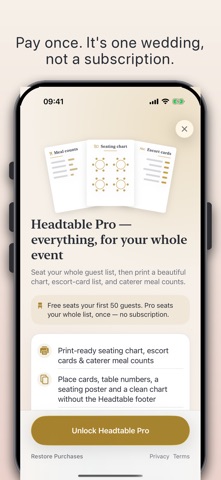
Seat every guest, stress-free. Headtable is the focused seating-chart planner for weddings, receptions, banquets and parties. Build your guest list, collect RSVPs online, drag guests onto tables, keep the right people together (and apart), plan with your partner, then print a chart worthy of the day. THE CANVAS • Set up the room in one step, then enter its size to plan to scale — Headtable flags tables that sit too close • Round, oval, square, head and sweetheart tables, banquet tables up to 60 chairs, one-sided tables, or two tables joined into one • Drag a guest onto any seat. Change your mind? Move them again in a second • Auto-arrange that respects your rules — or Mix up the seats for a fresh mix at a dinner party • Dance floor, DJ booth, bar, stage and more; trace your real venue from a photo or floor plan (Pro) • Unlimited undo. A guest can never be lost: the unseated tray always has them GUEST LIST • Groups (the Smiths +2), RSVP status, meal choice, dietary needs, VIPs and kids' meals • Paste a whole list, import from Contacts, or bring in a CSV from your spreadsheet • Keep-together and keep-apart rules — Headtable nudges you when a rule is broken, and never blocks you PLAN TOGETHER • Invite your partner, a parent or your planner: everyone edits the same plan from their own phone, even on another Apple Account, and changes appear in seconds • Up to four people. Inviting needs Pro; joining is free, with every Pro feature on that plan INVITATIONS & RSVP • Send each guest or household a private invitation link by message • Guests reply without an app or account: coming or not, their meal, allergies, and a plus-one if you allow it • Replies land on your guest list and free the seats of anyone who can't come FOR THE CATERER AND THE DAY • Per-table view with meal counts, and a printed chart color-coded by meal • Send each guest their seat in a personal text or email: "You're at Table 4" • Day-of check-in: tick guests off at the door, from one phone or several PRINT & SHARE (PRO) • The full print pack: a clean seating chart, per-table lists, an alphabetical escort list and a caterer meal summary, in eight designs • Fold-over place cards and table-number cards, ready to cut out • A find-my-seat QR code: guests scan it at the door, type their name and see their table • Multiple events — rehearsal dinner, ceremony, reception PRIVATE BY DESIGN Your guest list stays on your devices until you choose to share it. Invitation links, a find-my-seat page and a shared plan upload only what they need — never your guests' phone numbers or emails — and are deleted 30 days after the event, or as soon as you stop. No account, no ads, no tracking. HONEST PRICING Free: your whole guest list, unlimited tables and rules, and up to 50 seated guests — enough for most parties and small weddings — plus online invitations with your first 8 replies, your chart as a PDF, and joining a plan someone shares with you. Headtable Pro, one purchase shared through Family Sharing, seats everyone and adds every reply, the full print pack, the QR code, a venue photo, planning together and extra events. You plan an event once, and we price it that way. No subscription, ever. Made for iPhone and iPad, in light and dark.
What's new · 1.4
What's new in 1.4 • Plan together: invite your partner, a parent or your planner to edit the same plan from their own phone — even on a different Apple Account. Up to four people; changes appear in seconds. Inviting needs Pro, joining is free. • Send each guest their seat in a personal text or email. • Mix up the seats: a fresh random mix for dinner parties that still keeps couples and families together. • Plan the room to scale: enter its size and see which tables sit too close. • Long banquet tables up to 60 chairs, chairs on one side only, and joining two tables into one. • Seven print designs for the whole print pack (Pro). • Day-of check-in: tick guests off at the door. • Optional reminders, so a plan made over several evenings gets finished. • After you paste a list, one tap seats everyone; with no list yet, you can lay out the room first. • A new "How Headtable works" page in Settings, and many small fixes. Headtable is made by one person — if it helps, a rating helps other couples find it.
Details