

My CheckBox PRO Todo Calendar
jang sehoon · Productivity
Independent analytics for this App Store listing. AppTracker is not affiliated with jang sehoon.
Chart standing · US
What changed · US
Listing changes AppTracker has observed for this app in this storefront — new versions, price moves, rating shifts, and store copy.
Screenshots




About
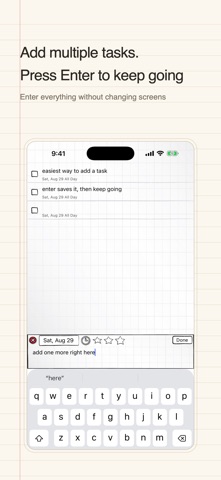
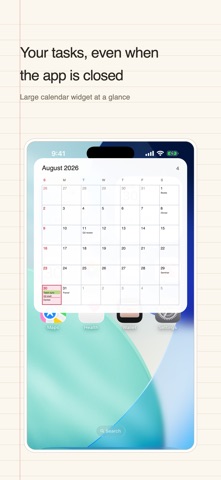
If capturing a task is slow, you stop doing it. My CheckBox PRO lets you type a line, hit enter, and keep going — the keyboard never gets in your way. Tasks land straight on the calendar, and one tap checks them off. ■ What's different from the free app - No ads — no banners, no interstitials, no tracking - All widgets unlocked — small, medium, large and Lock Screen - Unlimited categories (free version has 3) - Passcode lock - One purchase, yours to keep. Not a subscription. ■ How people use it - Add task after task without stopping — a whole shopping list in one go - While you type, you can see what's already on that date - Didn't finish? Move unfinished tasks to today or tomorrow with one tap - Set birthdays and anniversaries to repeat every year ■ Features - Calendar + tasks: tap a date and see that day's checklist instantly - Repeating events: weekly, monthly, yearly - National holidays displayed automatically for your country - Reminders: from right on time to 2 days before - App icon badge shows how many tasks are left today - D-Day calculator for 100-day and 1000-day milestones - Backup: iCloud and Google Drive - 10 handwriting fonts - Two-column layout on iPad in landscape - Available in 14 languages ■ Already bought Pro in the free app? Then you don't need this one. It's the same app without ads. ■ Bringing your data over Back up from the free app via Google Drive or iCloud in Settings, then restore here. Note: widgets need to be placed on your Home Screen again. Contact: crazydashdev@gmail.com Privacy Policy: https://dashhoon.github.io/nbros-privacy/ Terms of Service: https://dashhoon.github.io/terms_of_service/
Details