

Teleprompter: Voice Scrolling
Raj Thorat · Photo & Video
Independent analytics for this App Store listing. AppTracker is not affiliated with Raj Thorat.
Chart standing · US
What changed · US
Listing changes AppTracker has observed for this app in this storefront — new versions, price moves, rating shifts, and store copy.
• Redesigned script card that highlights the line you're on, plus a new camera-style record button • Smarter voice scrolling that keeps up when you skip or stumble, with live highlighting of the words it hears • Captions now timed to your own voice • New Scroll Speed slider for Manual mode • The same simple controls in Reaction and Front + Back recording • Clearer choices when you end a recording: Save, Discard or Keep Recording • Bug fixes and performance improvements
Screenshots



About
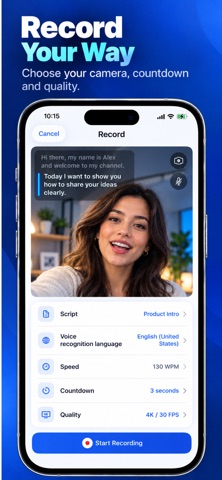
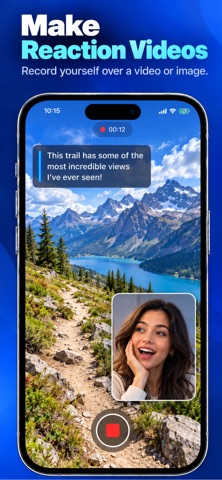
Speak naturally. Voptera keeps your script moving with your voice. Create or import a script, start recording, and deliver your message confidently without losing your place. Voice-powered scrolling follows your speech, pauses when you pause, and continues when you resume—helping you maintain eye contact and sound natural on camera. VOICE-POWERED TELEPROMPTER • Scroll your script automatically as you speak • Pause and resume naturally without touching the screen • Use adjustable auto-scroll with your preferred speaking speed • Enable mirror mode for professional teleprompter rigs • Choose your preferred voice-recognition language CREATE AND ORGANIZE SCRIPTS • Write and edit scripts directly in Voptera • Import scripts from PDF files • Organize your content using folders and tags • View word counts and estimated speaking duration RECORD YOUR WAY • Record using the front or rear camera • Capture video in HD or up to 4K • Set a countdown before recording begins • Create reaction videos over a background video or image • Record the front and back cameras simultaneously • Add automatic subtitles directly to your videos SAVE AND SHARE • Keep your recordings organized in History • Save completed videos to Photos • Share your content anywhere • Access your scripts and recordings from one simple workspace VOPTERA PRO Unlock voice-following scrolling, HD and 4K recording, automatic subtitles, and unlimited sharing. Your projects are stored on your device, giving you control over your content. Download Voptera and record with confidence. Privacy Policy: https://voptera.online/privacy.html Terms of Use: https://www.apple.com/legal/internet-services/itunes/dev/stdeula/
What's new · 1.2
• Redesigned script card that highlights the line you're on, plus a new camera-style record button • Smarter voice scrolling that keeps up when you skip or stumble, with live highlighting of the words it hears • Captions now timed to your own voice • New Scroll Speed slider for Manual mode • The same simple controls in Reaction and Front + Back recording • Clearer choices when you end a recording: Save, Discard or Keep Recording • Bug fixes and performance improvements
Details