

BoltType
Christian Techmer · Productivity
Independent analytics for this App Store listing. AppTracker is not affiliated with Christian Techmer.
Chart standing · US
What changed · US
Listing changes AppTracker has observed for this app in this storefront — new versions, price moves, rating shifts, and store copy.
WELCOME, iPhone Duo! A new device. New room for your ideas. BoltType 1.3 brings dedicated iPhone Duo support: layout, toolbars and search adapt as you fold and unfold. Discover a new way to write, read and explore your notes. New for iPhone and iPad: • Do more with PDFs: Open documents directly, select and copy text, add colored highlights and comments. Your original files remain unchanged. • Search the part you need: Switch between text, search results, links, highlights and the table of contents. Search the text of your highlights and comments too. • Navigate PDFs more easily: Page previews, direct page selection and a navigator with word, character and line steps help you reach the right passage and extend your selection. • Share PDFs your way: Export the unchanged original, a version with editable highlights and comments, or a version with flattened highlights and a comment summary. • Return to important passages: Link specific PDF passages to your notes and set reminders for them. Improved reopening restores your last document, reading position and zoom more reliably. • Easier importing and lookup: Improved PDF imports from Files and Safari through the Share Sheet. After explicit confirmation, look up selected text on the web with your chosen search provider. PDF features, document imports and reminders are part of BoltType Pro.
Screenshots



About
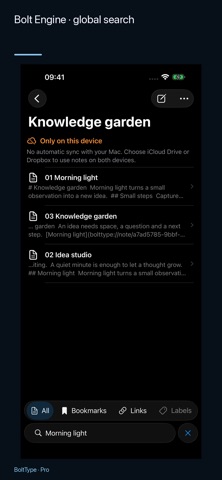
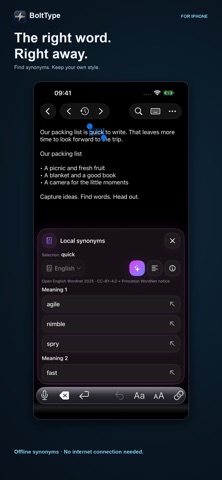
WELCOME, iPhone Duo! A new device. New room for your ideas. BoltType 1.3 brings dedicated iPhone Duo support: layout, toolbars and search adapt as you fold and unfold. Discover a new way to write, read and explore your notes. Your next idea can start anywhere. Capture a thought on iPhone or iPad, find it again when it matters, and build a connected collection of knowledge. BoltType works on its own—and with BoltType for Mac—while your notes remain ordinary files you control. START ON THE GO. CONTINUE ON YOUR MAC. Write down an idea on your iPhone, develop it on iPad and continue at your Mac. Use the same notes folder on your devices with Dropbox or iCloud Drive. After it has synced, you work with the same Markdown and text files—no export for every device change. A HOME FOR IDEAS, EVEN WITHOUT A MAC. BoltType is a standalone notes app for iPhone and iPad. Choose a folder in the Files app or connect Dropbox. You do not need a Mac or a BoltType account. Read, search and edit locally available text notes even when offline. WRITE WHILE THE IDEA IS FRESH. A quick reminder. A journal entry. The first page of your next project. Write in Markdown or plain text, format with the editor toolbar, and switch to the Markdown preview. When space allows, keep editor and preview side by side. Changes save automatically. FIND YOUR THREAD. Full-text search brings your words back. Bookmark important notes and switch between libraries. BoltType remembers where you were reading, so it is easy to pick up the thread. TURN NOTES INTO A KNOWLEDGE NETWORK. Link notes together and point to specific passages. Build a personal Zettelkasten, research collection or project wiki. Back and forward navigation keeps the context intact as you follow ideas. Open web links and approved app links from your notes. You decide which external link types may open in Settings. YOUR NOTES. YOUR FILES. BoltType works with .md, .markdown and .txt files in a folder you choose. Your notes stay compatible with other editors. No proprietary format. No required BoltType account. Existing Markdown and text notes work directly; subfolders are not scanned. MORE WITH BOLTTYPE PRO. Unlock with a one-time in-app purchase: • Organize notes with colored labels and projects. • Filter by link types and navigate between links. • Search text in PDFs and images with on-device recognition. • Import text, links, images and PDFs from the Share Sheet. • Compare locally stored past versions and restore selected changes. • Set reminders for notes. Writing, search, bookmarks and internal links are available without Pro. Dropbox and iCloud Drive are optional and require a connection to their respective services to sync between devices. Version history and reminders are stored on the current device. External app links require the relevant app and content. Would you like support for another file format, link type, or app? Feel free to get in touch. I’ll look into whether the integration can be implemented in a useful and reliable way.
What's new · 1.3
WELCOME, iPhone Duo! A new device. New room for your ideas. BoltType 1.3 brings dedicated iPhone Duo support: layout, toolbars and search adapt as you fold and unfold. Discover a new way to write, read and explore your notes. New for iPhone and iPad: • Do more with PDFs: Open documents directly, select and copy text, add colored highlights and comments. Your original files remain unchanged. • Search the part you need: Switch between text, search results, links, highlights and the table of contents. Search the text of your highlights and comments too. • Navigate PDFs more easily: Page previews, direct page selection and a navigator with word, character and line steps help you reach the right passage and extend your selection. • Share PDFs your way: Export the unchanged original, a version with editable highlights and comments, or a version with flattened highlights and a comment summary. • Return to important passages: Link specific PDF passages to your notes and set reminders for them. Improved reopening restores your last document, reading position and zoom more reliably. • Easier importing and lookup: Improved PDF imports from Files and Safari through the Share Sheet. After explicit confirmation, look up selected text on the web with your chosen search provider. PDF features, document imports and reminders are part of BoltType Pro.
Details