

Teleprompter — Read to Camera
Yurii Koshkin · Photo & Video
Independent analytics for this App Store listing. AppTracker is not affiliated with Yurii Koshkin.
Chart standing · US
What changed · US
Listing changes AppTracker has observed for this app in this storefront — new versions, price moves, rating shifts, and store copy.
See yourself while the words move. Find your natural pace. Camera preview only. Not recording. Improved purchase-screen layout and billing details.
Screenshots


About
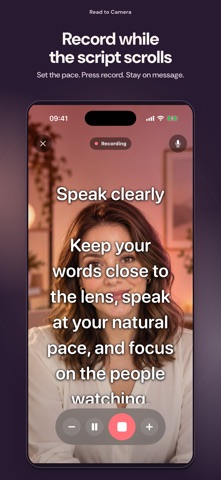
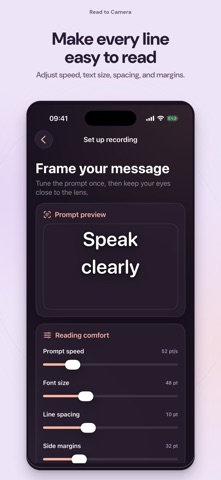
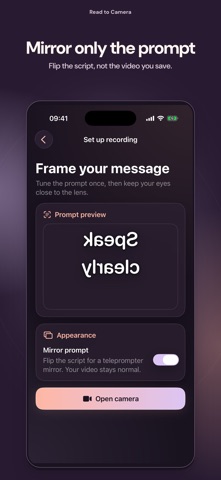
Read to Camera turns your iPhone into a focused teleprompter and front-camera recorder. Keep your script close to the lens, speak naturally, and create a clean video without memorizing every line. READ WITH CONFIDENCE • Write or paste scripts in a private on-device library • Adjust scrolling speed, text size, spacing, margins and text color • Mirror only the prompt for a beam-splitter setup while your saved video stays normal • Choose a 3, 5, or 10 second countdown RECORD A CLEAN VIDEO • Record with the front camera and microphone, or explicitly continue without sound • Choose portrait or landscape before recording and keep that orientation locked • Pause or resume the prompt and change its speed while recording • Preview, save to Photos, share, or record another take • Prompt controls never appear in the finished video TRY THE COMPLETE WORKFLOW Access varies: some can export one watermark-free video; others need Pro before recording. See yourself with the words over your camera. This preview is not recorded. PRIVATE BY DESIGN Your scripts and recording drafts stay on this iPhone. Read to Camera needs no account, cloud workspace, or product-owned server. Product analytics is enabled by default and can be turned off in Settings; analytics never includes scripts, recordings, camera video or microphone audio. PRO OPTIONS Pro recording features require an in-app purchase. Monthly and Annual subscriptions unlock the same features and renew automatically unless canceled. Lifetime unlocks the same features with one purchase and no renewal. Restore is available in Settings and the paywall. Built for creators, presenters, educators, auditions, courses, product videos, social content, and any moment when you want to speak clearly without looking away from the lens. Terms of Use (EULA): https://www.apple.com/legal/internet-services/itunes/dev/stdeula/
What's new · 1.0.6
See yourself while the words move. Find your natural pace. Camera preview only. Not recording. Improved purchase-screen layout and billing details.
Details