

PDF Komprimieren & Bilder
Heinz Meier · Utilities
Independent analytics for this App Store listing. AppTracker is not affiliated with Heinz Meier.
Chart standing · US
What changed · US
Listing changes AppTracker has observed for this app in this storefront — new versions, price moves, rating shifts, and store copy.
• Updated in-app purchase support • Minor improvements and bug fixes
In-app purchases · US
What this app sells inside itself, grouped by kind and priced for this storefront.
Screenshots



About
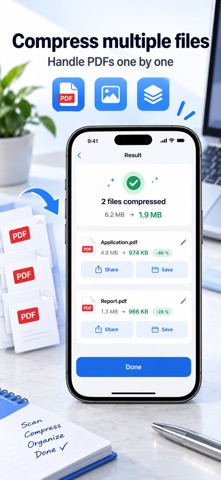
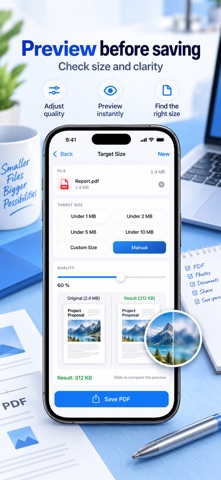
File too large for the upload form? Just say how big it may be – your iPhone does the rest. Government portals, job application forms and insurers want files "under 5 MB". That is exactly what this app is for: you pick the target size, not some abstract quality value. • Tap a target: under 1 MB, 2 MB, 5 MB, 10 MB or your own size • The app keeps trying until the result lands just under it • Before/after at a glance: 4.9 MB → 974 KB (−80%) COMPLETELY OFFLINE Your documents never leave your iPhone. This app has no networking capability at all – there simply is no upload code in it. Applications, contracts, medical records and ID scans stay where they belong. TEXT LAYER PRESERVED Pages with real text are never turned into an image. Your compressed PDF stays searchable and selectable – exactly what cheap compressors get wrong. Pure scans are re-encoded instead, because that is where the megabytes are. SHRINK PDFs • Choose resolution: 150, 200 or 300 dpi • Grayscale – often halves the size of a scan • Compress only selected pages • Embedded thumbnails and unused data are dropped COMPRESS & CONVERT IMAGES • HEIC → JPEG when a portal rejects your file • PNG → JPEG, resize by longest edge or percentage • Manual mode with live preview: see the result before you export IMAGES TO PDF Turn several photos into one A4 PDF – set the order, choose the margin, compressed in a single pass. PRIVACY BY DEFAULT GPS location, camera model and author are stripped from every image by default. HONEST, NOT FLATTERING If a target size cannot be reached without destroying legibility, the app says so instead of shipping mush. And if a file is already small enough, it is left untouched. BUY ONCE, NO SUBSCRIPTION Free: 3 files per day, all target sizes, full quality, no watermark. Pro (one-time): unlimited files, batch processing and images → PDF. No sign-up. No account. No ads. No data collection.
What's new · 1.1.3
• Updated in-app purchase support • Minor improvements and bug fixes
Details