

Music Nest: Local HiFi Player
少泽 梁 · Music
Independent analytics for this App Store listing. AppTracker is not affiliated with 少泽 梁.
Chart standing · US
What changed · US
Listing changes AppTracker has observed for this app in this storefront — new versions, price moves, rating shifts, and store copy.
What's New: • Added Advanced Features plans for monthly, yearly, and lifetime access, with restore purchases • Advanced access lets you manage more playlists and network music sources, and edit track information • Added View Album to the Now Playing screen; remote playback can find lyrics and artwork in the same folder • Improved the purchase flow and artwork refresh, fixing artwork that did not update promptly during playback • Added a Home Screen playback control widget; the lyrics widget now supports medium size • Improved Lock Screen and Control Center updates during local FLAC playback • Improved album and artist grouping and folder playback for smoother browsing of large libraries • Album grids adapt to iPad landscape; fixed CarPlay autoplay timing at launch • Improved Baidu Netdisk connection, token refresh, download progress, and fallback artwork in lists
Screenshots


About
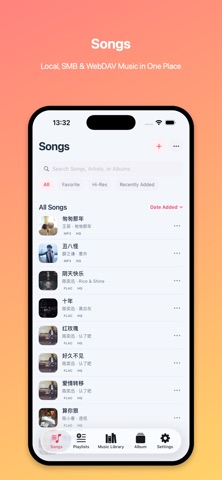
Music Nest is a local music player and private library for people who own their audio files. Whether your collection lives on iPhone storage, folders, a NAS, an SMB/WebDAV server or Baidu Netdisk, you can organize, browse and play it in one place. Your music, artwork, lyrics, tags, playlists and listening history stay under your control. 【Import and multiple sources】 Import audio from Files, Wi-Fi transfer and system sharing. Connect your own SMB or WebDAV server to browse remote files, stream them, or download them for local playback. You can also browse, download and play your own music files from Baidu Netdisk. Network sources access only files you own or are authorized to use. Music Nest does not provide third-party streaming content or music downloads. 【Library organization and metadata】 Organize music by songs, albums, artists, folders and playlists. Search, sort, favorite and filter by recently played, unplayed, Hi-Res and format. Create playlists, run batch actions, and edit titles, artists, albums, genres, years, ratings, artwork and lyrics. Metadata lookup and better artwork fallback help large libraries stay cleaner and easier to browse. 【Playback, lyrics and queue control】 Use a playback queue with shuffle and repeat modes, remembered progress, a mini player and a full-screen player. Home Screen playback and lyrics widgets show the current song and lyrics with controls to skip, play or pause without opening the app. View embedded lyrics, import LRC or lyric files, and see artwork, artist, album and audio details while listening. Local files, cached downloads and remote sources fit into the same playback flow, so it is easy to keep albums, playlists and spoken-word collections moving. 【Built for personal collections】 Music Nest plays MP3, M4A, AAC, WAV, AIFF, FLAC, ALAC, APE, OGG, OPUS, WMA and DSF, covering lossless and high-resolution libraries. It also works well for audiobooks, podcasts, lessons and language-study recordings. CarPlay support makes playback easier in the car, and equalizer protection options help reduce accidental audio changes. Music Nest does not supply music; it focuses on helping you play and manage your own files. 【Agreements】 Before using this App, please read the following agreements carefully to understand the service rules and protections: Apple End User License Agreement: https://www.apple.com/legal/internet-services/itunes/dev/stdeula/ Terms of Use: https://www.sharezer.com/app/agreement/TermsofUse.html Privacy Policy: https://www.sharezer.com/app/agreement/PrivacyPolicy.html
What's new · 1.3.2
What's New: • Added Advanced Features plans for monthly, yearly, and lifetime access, with restore purchases • Advanced access lets you manage more playlists and network music sources, and edit track information • Added View Album to the Now Playing screen; remote playback can find lyrics and artwork in the same folder • Improved the purchase flow and artwork refresh, fixing artwork that did not update promptly during playback • Added a Home Screen playback control widget; the lyrics widget now supports medium size • Improved Lock Screen and Control Center updates during local FLAC playback • Improved album and artist grouping and folder playback for smoother browsing of large libraries • Album grids adapt to iPad landscape; fixed CarPlay autoplay timing at launch • Improved Baidu Netdisk connection, token refresh, download progress, and fallback artwork in lists
Details