

Beoltteok Alarm
SANGHOON LEE · Utilities
Independent analytics for this App Store listing. AppTracker is not affiliated with SANGHOON LEE.
Chart standing · US
What changed · US
Listing changes AppTracker has observed for this app in this storefront — new versions, price moves, rating shifts, and store copy.
Alarms can now skip holidays. · Turn on Skip Holidays when editing a repeating alarm and it won't ring on public or substitute holidays — it moves on to the next occurrence, the same way weekends are left out. · Holidays for South Korea, the United States, Japan, China, Spain and Germany are included through 2040, right inside the app. No internet connection needed. · Choose the country in Settings → Holidays. It defaults to your device region.
Screenshots

About
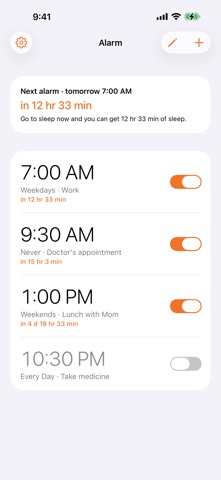
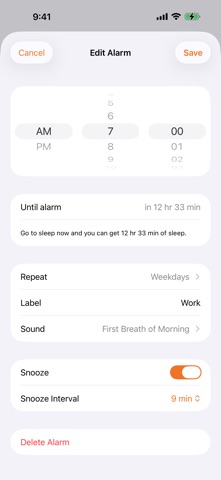
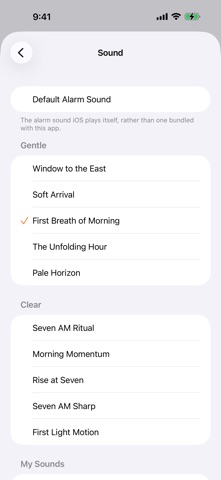
Ever set an alarm and then work out in your head how much sleep you're going to get? Beoltteok shows the time remaining under every alarm in the list. No math required. ■ Time remaining, at a glance Each alarm shows something like "in 9 hr 53 min". At the top of the list you see your next alarm and how long you'd sleep if you went to bed now. Alarms you've turned off show nothing. ■ Breaks through Silent and Focus Built on the iOS 26 alarm framework. It rings with the silent switch on, with Sleep Focus enabled, and during Driving Focus. Alarms survive a restart. ■ 12-hour time picker Three wheels — AM/PM, hour, minute. It stays 12-hour even if your device is set to 24-hour time. ■ Repeat however you like Never, every day, weekdays, weekends, or pick individual days. ■ Skip just this once Taking tomorrow off? Skip the next occurrence without turning the alarm off. It returns to normal on its own once that time has passed. ■ Alarm sounds Purpose-made sounds, plus any audio from your Files app. Preview before you choose, and every sound is loudness-matched so switching never surprises you. ■ Widgets and Shortcuts See the countdown on your Home Screen and Lock Screen, and ask Siri for your next alarm or to skip one. ■ No ads, no account, no data collection Every feature is free. There is no server; alarms stay on your device. Tipping the developer is optional and unlocks nothing.
What's new · 1.1.0
Alarms can now skip holidays. · Turn on Skip Holidays when editing a repeating alarm and it won't ring on public or substitute holidays — it moves on to the next occurrence, the same way weekends are left out. · Holidays for South Korea, the United States, Japan, China, Spain and Germany are included through 2040, right inside the app. No internet connection needed. · Choose the country in Settings → Holidays. It defaults to your device region.
Details