

ParentClock
YongShin Kwak · Utilities
Independent analytics for this App Store listing. AppTracker is not affiliated with YongShin Kwak.
Chart standing · US
What changed · US
Listing changes AppTracker has observed for this app in this storefront — new versions, price moves, rating shifts, and store copy.
Changed the default language on the App Store to English.
In-app purchases · US
No in-app purchases.
Screenshots



About
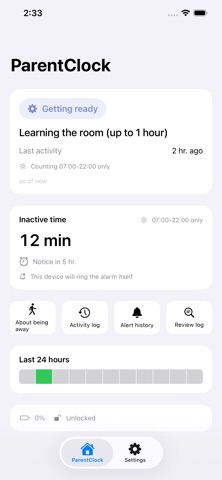
A desk clock for your parent's room. It uses the front camera to detect only changes in motion — photos and video are never stored and never sent. It isn't there to see what they're doing. It's there to notice, quietly, that they're going about their day. ■ A clock they can read without reaching for their glasses Flip clock, mega clock, or word clock — pick the face that suits them. The screen stays on all day, while automatic brightness and screen protection keep the iPad healthy over the long run. ■ A quiet check-in that never keeps a photo Every 15 seconds the front camera checks one thing: was there movement? The image is compared on the device in that instant and discarded immediately. It is never saved anywhere and never leaves the iPad. All that reaches our server is "there was movement" or "there wasn't", and the time. ■ If it stays quiet too long, only your family hears about it If there is no movement for 12 hours during the daytime window, the paired family member gets a notification. Alerts escalate in steps — Notice, then Warning, then Urgent — and your family can tap "All good" at any time to clear it. ■ Your parent never has to learn an app You walk them through setup over the phone, and they only need to read out a 6-digit number. There are no complicated menus on their screen. ■ Things we would rather tell you up front · In the dark, a camera cannot see movement. That is a physical limit — and sleeping hours are not counted in the first place. · Because the count runs on daytime inactivity, depending on your settings a real alert can take half a day or more to arrive. · It works best on an iPad that is not otherwise in daily use. On an iPad used all day for video and messaging, monitoring will be interrupted often. · This app is not a medical device and does not respond to emergencies. It is a supporting tool that helps you check in on someone. ■ Who it is for · Anyone with a parent living alone · Anyone whose parent finds a home camera intrusive, and who does not feel quite reassured by the occasional phone call · Anyone with a spare iPad from three or four years ago sitting in a drawer (iOS 17 or later required)
What's new · 1.0.2
Changed the default language on the App Store to English.
Details