

Monolist: To Do List & Tasks
Pavel Nesterets · Productivity
Independent analytics for this App Store listing. AppTracker is not affiliated with Pavel Nesterets.
Chart standing · US
What changed · US
Listing changes AppTracker has observed for this app in this storefront — new versions, price moves, rating shifts, and store copy.
• Siri and Shortcuts: add and complete tasks by voice, and find them in Spotlight. • A New Task button for Control Center, the Lock Screen and the Action button. • Up Next now comes in Lock Screen sizes. • Reminders can be completed or snoozed for 15 minutes right from the notification. • Now in Spanish and Italian
Screenshots



About
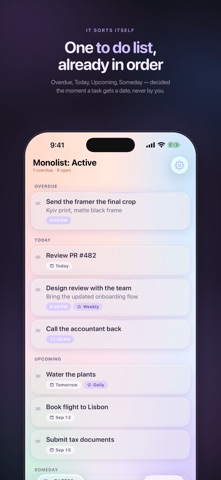
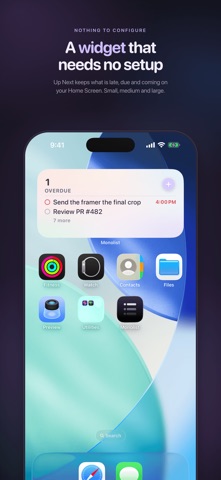
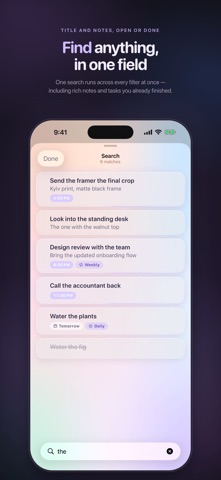
Most to-do apps need a manual. Monolist doesn't. One clean list, sorted for you - Overdue, Today, Upcoming, Someday at the moment you add a task. No projects to set up, no tags to manage. Just get things done. WHAT IT DOES • Smart sections - tasks sort themselves into Overdue, Today, Upcoming and Someday • Reminders - a nudge 5 minutes, 15 minutes, 1 hour or 1 day before, or your own time; complete or snooze it right from the notification • Repeating tasks - daily, weekly, monthly, yearly, weekdays, weekends or the days you pick; set once and forget • Rich notes - add formatted detail to any task, right where you need it • Drag to reorder - arrange your day exactly how you want it • Instant search - find any task or note in a tap • Widgets - Up Next on the Home Screen in three sizes and on the Lock Screen, no setup required • Siri and Shortcuts - say "Add a task in Monolist"; your tasks show up in Spotlight • Control Center button - a new task in one tap, from the Action button too • Synced everywhere - iCloud keeps iPhone, iPad and Mac perfectly in sync • Built for Mac - real keyboard shortcuts (⌘N new task, ⌘F find, ⌘1–3 to filter) • Calm by design - a soft glass interface that never feels busy or cluttered Download it and get your day under control - one clean list at a time.
What's new · 1.1.0
• Siri and Shortcuts: add and complete tasks by voice, and find them in Spotlight. • A New Task button for Control Center, the Lock Screen and the Action button. • Up Next now comes in Lock Screen sizes. • Reminders can be completed or snoozed for 15 minutes right from the notification. • Now in Spanish and Italian
Details