

Frame Relay: TV Photo Transfer
JudeWorks LLC · Photo & Video
Independent analytics for this App Store listing. AppTracker is not affiliated with JudeWorks LLC.
Chart standing · US
What changed · US
Listing changes AppTracker has observed for this app in this storefront — new versions, price moves, rating shifts, and store copy.
A simpler, calmer Frame Relay, built around the Frame on your wall. • A new home screen. Open the app and see your Frame with the art it's showing right now, a one-line status, and the pieces you've sent to it. Tap any piece to show it. Swipe between Frames, or pick one from the menu on its name. • Add Art, in one place. Your photos, the included collection and collages are all one tap from the home screen. • Send straight from the editor. Frame it, tap Send, and watch it go up. No extra review screens. If something goes wrong, your edit stays exactly as it was, with clear steps to fix it. • Frame Relay wakes your Frame for you. If your Frame is asleep, the app wakes it over Wi-Fi before sending. Turn on Power On with Mobile on the Frame to let it. • A clearer status line. The home screen tells you if your Frame is showing art, showing TV, asleep, or can't be reached, and what to do about it. • A shorter welcome. Setup is now three quick steps: welcome, find your Frame, and approve it on the TV. • Easier setup for every Frame you add. Each new Frame gets one page for its name, bezel, size and orientation, and a list of what it can do. • Send several photos at once from Your photos with the new Select mode. • Clear signs that something is working, wherever the app is loading or sending. • Collage now starts by letting you choose your photos.
In-app purchases · US
What this app sells inside itself, grouped by kind and priced for this storefront.
Screenshots






About
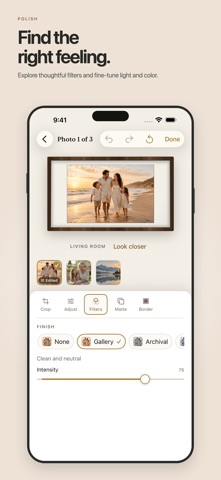
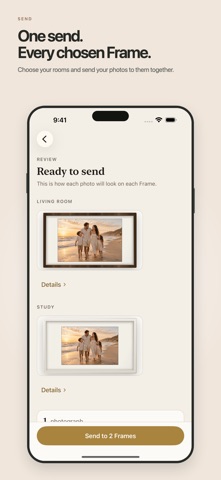
Send your own photos to the art TV on your wall, straight from your iPhone or iPad over your home Wi-Fi. Works with Samsung The Frame TVs from model year 2020 onward. Frame Relay finds your TV, helps you crop and style each photo, shows exactly how it will look on the wall, and transfers it directly. No account, no cloud photo uploads, and no subscription. EDIT AND FRAME • Crop, zoom, straighten, rotate, and flip • Adjust light, color, sharpness, and more • Apply filters, mattes, borders, keylines, and textures • Preview each photo before sending • Create personal photo collages • Keep original photos unchanged SEND AND MANAGE • Send to one TV or several at once • Browse the artwork stored on each TV • Choose what's showing next, or remove your own uploads • Adjust the brightness, warmth, and motion settings your TV supports • Share photos into Frame Relay from the Photos app TRY BEFORE UNLOCKING Pair one TV and send the included artwork for free. Full Access is a one-time purchase that unlocks your own photos, collages, additional TVs, sending to several TVs at once, gallery management, and TV controls. There is no subscription. PRIVACY Photos are processed on your device, and transfers stay on your local network. Frame Relay has no account, advertising, tracking, analytics SDK, or cloud photo service. REQUIREMENTS • Samsung The Frame TV, model year 2020 or newer • iPhone or iPad on the same Wi-Fi network as the TV • Local Network permission • Approval on the TV the first time you pair 2018 and 2019 models use an older transfer system and are not supported in this release. Frame Relay is an independent app. It is not made by, affiliated with, sponsored by, or endorsed by Samsung Electronics. Samsung and The Frame are trademarks of Samsung Electronics Co., Ltd.
What's new · 1.1
A simpler, calmer Frame Relay, built around the Frame on your wall. • A new home screen. Open the app and see your Frame with the art it's showing right now, a one-line status, and the pieces you've sent to it. Tap any piece to show it. Swipe between Frames, or pick one from the menu on its name. • Add Art, in one place. Your photos, the included collection and collages are all one tap from the home screen. • Send straight from the editor. Frame it, tap Send, and watch it go up. No extra review screens. If something goes wrong, your edit stays exactly as it was, with clear steps to fix it. • Frame Relay wakes your Frame for you. If your Frame is asleep, the app wakes it over Wi-Fi before sending. Turn on Power On with Mobile on the Frame to let it. • A clearer status line. The home screen tells you if your Frame is showing art, showing TV, asleep, or can't be reached, and what to do about it. • A shorter welcome. Setup is now three quick steps: welcome, find your Frame, and approve it on the TV. • Easier setup for every Frame you add. Each new Frame gets one page for its name, bezel, size and orientation, and a list of what it can do. • Send several photos at once from Your photos with the new Select mode. • Clear signs that something is working, wherever the app is loading or sending. • Collage now starts by letting you choose your photos.
Details