

MetroMinute: Train Times
Hongfei Zhou · Travel
Independent analytics for this App Store listing. AppTracker is not affiliated with Hongfei Zhou.
Chart standing · US
What changed · US
Listing changes AppTracker has observed for this app in this storefront — new versions, price moves, rating shifts, and store copy.
A fresh look for your daily commute: - Route-colored backgrounds and translucent cards in light and dark mode. - Refined countdowns with clearer numbers and minute labels. - Updated stop headers, system tabs, and service-alert styling. - Station photos where a matching image is available.
Screenshots




About
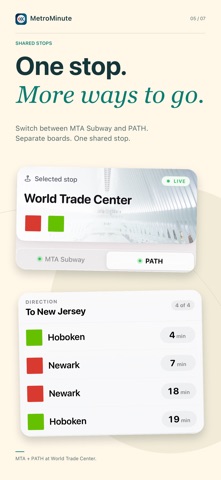
See the next train or ferry at a glance. MetroMinute shows upcoming departures at the nearest supported stop or any stop you choose, in one clear, readable view. CHECK BEFORE YOU GO See departures grouped by direction or destination, with countdowns, route badges, and platform information when available. Switch between supported systems at shared stops, reopen recent stops, and check official service alerts where provided. A FRESH VIEW OF YOUR STOP Route-colored backgrounds, translucent cards, and refined countdowns make the departure board easy to scan. The interface adapts to light and dark mode. Stop headers can show a station photo when a matching image is available. NEARBY DEPARTURES ON YOUR HOME SCREEN Add the Small or Medium Nearby Departures widget. Each shows up to two directions at the nearest supported stop: Small displays up to two departures per direction, and Medium up to four. iOS controls when widgets refresh, so open the app for the latest available information. FOUR METRO AREAS, SEVEN TRANSIT SYSTEMS New York City: MTA Subway, PATH, and NYC Ferry San Francisco Bay Area: BART and Caltrain Boston: MBTA rapid transit Chicago: CTA 'L' CHOOSE THE SYSTEMS YOU USE Include the transit systems you want in each area. Your choices apply to nearby stops, search, and the widget. Search by stop, route, or system within your selected area, or pull down on a departure board to refresh. OPTIONAL LOCATION Allow location access to find the nearest supported stop, or choose an area and stop manually. The widget needs permission to use your location while widgets are in use. Location is processed on your device; MetroMinute does not record a location history or send your coordinates in transit-data requests. No account, advertising, analytics, or continuous background location tracking. MetroMinute focuses on departures; it does not provide maps, trip planning, or ticket sales. Station photos are requested from Wikipedia and image-hosting services using a reviewed station article title. These requests do not include GPS coordinates, but the stop name can indicate the area you are viewing or near. Photos are illustrative and may be missing or mismatched; use the stop name and official signage to identify your stop. Transit information comes from third-party transit services and can be delayed, changed, or unavailable. A countdown or boarding status does not guarantee that a vehicle can still be boarded. Follow official signage and staff guidance.
What's new · 1.1
A fresh look for your daily commute: - Route-colored backgrounds and translucent cards in light and dark mode. - Refined countdowns with clearer numbers and minute labels. - Updated stop headers, system tabs, and service-alert styling. - Station photos where a matching image is available.
Details