

RoutineArc
Jason Fraser · Productivity
Independent analytics for this App Store listing. AppTracker is not affiliated with Jason Fraser.
Chart standing · US
What changed · US
Listing changes AppTracker has observed for this app in this storefront — new versions, price moves, rating shifts, and store copy.
NEW IN 2.3 RoutineArc plans your day entirely on your device — no account, no cloud. WIDGETS THAT FIT YOUR SCREEN • Day Overview and Home show whole tasks, the most important first, and Home keeps its date on one line. • The large Day Briefing keeps its date, footer and full-size clock on smaller iPhones, and Tasks and Priority Matrix give titles more room. • Widget dates follow your device's order, a task ticked in a widget is kept until the app saves it, and CSV-imported events appear. • On iPhone, if you turn on Live Activity, the expanded Dynamic Island, where the iPhone has one, no longer cuts off "ENDS IN". DATES AND TIMES YOUR WAY • Times and dates follow your device, also when its region differs from its language: 15:05 on a 24-hour clock, Wed 23 Sept with the day first. Today, the Calendar and tasks always use the Gregorian calendar. • A change to the 24-hour clock or the region shows as soon as you come back to RoutineArc. • Where the day comes first, a typed or spoken 5/10 now means the 5th of October. A date unreadable in your device's order is left off, with a note saying why. • "Dentist on Friday" becomes an all-day event, not an hour at midnight, "conference Oct 5-7" one event across those days, and a dateless event a task. • All-day and multi-day events show on each day they cover, an event past midnight shows its part of each day, and a date-only task no longer reminds you at midnight. • Overdue counts go by calendar days, and dragging an event across a clock change keeps the time you dropped it on. VOICEOVER • Task rows say their status, priority and due date, with actions to mark done, start focus, break down and delete. • The app now says what changed: a deletion and how to undo it, what a capture added, a task marked done. • Screens have headings, buttons say they are buttons and checkboxes whether ticked, and the Undo message no longer covers the bottom buttons. REMINDERS, FOCUS AND THE PLAN • Tapping a reminder opens its task or event, even when the tap starts RoutineArc. • Pressing Allow when you turn reminders on is no longer reported as a refusal. • Moving an event or task now moves its "Time to leave" alert with it. • Control Center, Notification Center or a call banner no longer fails Strict Mode or stops a stopwatch, and Strict Mode keeps the screen on. • A focus session that ends in the background counts its own length, and one running when the app is closed or swiped away is kept. Focus time is recorded when focus starts from a task. • Stopwatch laps show the time that really passed. • Export to PDF shares the plan on screen, named for its day, instead of every task you have. • Plan my day treats an event running since last night, like a night shift, as busy until it ends. • The Calendar's red current-time line shows at every hour of today, and the day view opens at it. CAPTURE • Scan text, Attach photo and Camera Scan now open the camera or photo library. • The send arrow saves on the first tap, even with the keyboard up, and scrolling Today hides the keyboard. • A capture saved only in part says what was saved and clears the bar, so resending adds no duplicates. YOUR DATA AND BACKUPS • If RoutineArc cannot read your data, Today says so and offers to export a copy, and nothing is written until it can. • Changes save one at a time and whole, so a restore, an import or a quick second tap no longer undoes a change or saves it twice. • A restored backup's settings apply at once, and no Undo or suggestion from before the restore can write into it. PURCHASES • If a renewal payment fails, you stay unlocked through Apple's billing grace period, and Today asks you to update it. • Restore says when it could not reach the App Store, instead of saying no purchase was found. • After the free week, a save that needs an unlock opens the unlock screen, in front, instead of doing nothing. ALSO • Driving Mode is gone: its notification could be swiped away, so it could not stay pinned as promised.
Screenshots






About
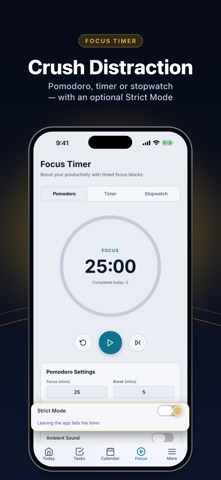
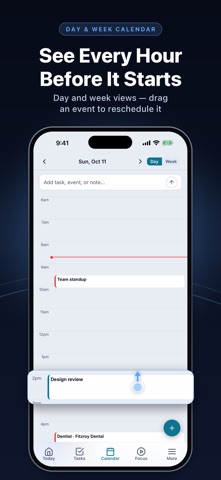
Your to-do list isn't a plan. RoutineArc turns it into one: tap Plan my day and what's due is fitted into the gaps between your events. No account, no cloud, no tracking. ONE-TAP DAY PLAN One tap builds a day plan around your events, your work hours and what's due — ordinary arithmetic over your schedule, not a guess, so it's instant. It honours what you said when you captured, like a hard stop or "this one before that one", and when the day can't hold everything it says how many tasks didn't fit. Export the plan to PDF, or let the On Deck card walk you through one thing at a time. CAPTURE THE WAY YOU SPEAK Type or dictate naturally — "dentist tomorrow at 3pm", "lunch with Sarah at Cafe Roma thursday noon" — and RoutineArc turns it into tasks, events and notes with the date, time, place and priority filled in. Scan a photo or screenshot to pull its text into items. BEAT TASK PARALYSIS Priorities P1–P4 on an Eisenhower matrix you can touch: hold a task and drag it into Do First, Schedule, Delegate or Eliminate. Plus subtasks, tags, recurrence and a weekly review. FOCUS WHEN IT COUNTS Pomodoro, countdown and stopwatch modes, focus and break lengths you set, and per-task sessions started straight from the list. Strict Mode fails a timer you walk away from. END EVERY DAY ALL CAUGHT UP Evening Triage shows overdue tasks one at a time: roll it over, finish it or delete it. Keep It Honest flags anything you've pushed three times. A CALENDAR YOU CAN TOUCH Day and week views with drag to reschedule. Tasks with due times sit beside your events, so the day is one picture. HABITS, NOTES AND INSIGHTS Daily habits with streaks, searchable notes, and insights into your focused time and how long tasks really take. ON YOUR HOME SCREEN Five widgets: Day Overview, Home, Tasks, Priority Matrix, and Day Briefing. On iPhone, turn on Live Activity and the current block follows you to the Lock Screen and, where the iPhone has one, the Dynamic Island. ON-DEVICE AI With Apple Intelligence, understanding what you type, summarising a note, and suggesting subtasks run on the Neural Engine — nothing is sent to a server. Without it, a fast deterministic rules engine takes over. PRIVATE BY DESIGN No account, no analytics, no tracking. Everything the app itself sends goes through Apple. SEVEN DAYS, THEN YOURS TO KEEP Free for seven days — no sign-up, no card. Then RoutineArc turns read-only until you unlock it: everything stays readable, searchable, exportable and deletable, and you can still tick tasks off and defer them. Backing up and restoring by hand stay free for good. Unlock monthly, yearly or once for life; the automatic daily backup comes with monthly, yearly and the Unlimited lifetime unlock. Works fully offline, in Light and Dark Mode, with eight color palettes, adjustable text sizes and high contrast. It does not sync with Apple or Google Calendar: your events live in RoutineArc. SUBSCRIPTION DETAILS RoutineArc Unlimited — Monthly: billed per month, auto-renewing. RoutineArc Unlimited — Yearly: billed per year, auto-renewing. RoutineArc Essentials: one payment; capturing and editing forever, without the automatic daily backup. RoutineArc Unlimited — Lifetime: a single payment that never renews. Payment is charged to your Apple Account at confirmation. A subscription renews automatically unless it is cancelled at least 24 hours before the end of the current period, and your account is charged for renewal within 24 hours of the end of the period. You can manage or cancel it at any time in your Apple Account settings. Terms of Use (EULA): https://www.apple.com/legal/internet-services/itunes/dev/stdeula/ Privacy Policy: https://jasonf90.github.io/routinearc-site/privacy-policy.html
What's new · 2.3
NEW IN 2.3 RoutineArc plans your day entirely on your device — no account, no cloud. WIDGETS THAT FIT YOUR SCREEN • Day Overview and Home show whole tasks, the most important first, and Home keeps its date on one line. • The large Day Briefing keeps its date, footer and full-size clock on smaller iPhones, and Tasks and Priority Matrix give titles more room. • Widget dates follow your device's order, a task ticked in a widget is kept until the app saves it, and CSV-imported events appear. • On iPhone, if you turn on Live Activity, the expanded Dynamic Island, where the iPhone has one, no longer cuts off "ENDS IN". DATES AND TIMES YOUR WAY • Times and dates follow your device, also when its region differs from its language: 15:05 on a 24-hour clock, Wed 23 Sept with the day first. Today, the Calendar and tasks always use the Gregorian calendar. • A change to the 24-hour clock or the region shows as soon as you come back to RoutineArc. • Where the day comes first, a typed or spoken 5/10 now means the 5th of October. A date unreadable in your device's order is left off, with a note saying why. • "Dentist on Friday" becomes an all-day event, not an hour at midnight, "conference Oct 5-7" one event across those days, and a dateless event a task. • All-day and multi-day events show on each day they cover, an event past midnight shows its part of each day, and a date-only task no longer reminds you at midnight. • Overdue counts go by calendar days, and dragging an event across a clock change keeps the time you dropped it on. VOICEOVER • Task rows say their status, priority and due date, with actions to mark done, start focus, break down and delete. • The app now says what changed: a deletion and how to undo it, what a capture added, a task marked done. • Screens have headings, buttons say they are buttons and checkboxes whether ticked, and the Undo message no longer covers the bottom buttons. REMINDERS, FOCUS AND THE PLAN • Tapping a reminder opens its task or event, even when the tap starts RoutineArc. • Pressing Allow when you turn reminders on is no longer reported as a refusal. • Moving an event or task now moves its "Time to leave" alert with it. • Control Center, Notification Center or a call banner no longer fails Strict Mode or stops a stopwatch, and Strict Mode keeps the screen on. • A focus session that ends in the background counts its own length, and one running when the app is closed or swiped away is kept. Focus time is recorded when focus starts from a task. • Stopwatch laps show the time that really passed. • Export to PDF shares the plan on screen, named for its day, instead of every task you have. • Plan my day treats an event running since last night, like a night shift, as busy until it ends. • The Calendar's red current-time line shows at every hour of today, and the day view opens at it. CAPTURE • Scan text, Attach photo and Camera Scan now open the camera or photo library. • The send arrow saves on the first tap, even with the keyboard up, and scrolling Today hides the keyboard. • A capture saved only in part says what was saved and clears the bar, so resending adds no duplicates. YOUR DATA AND BACKUPS • If RoutineArc cannot read your data, Today says so and offers to export a copy, and nothing is written until it can. • Changes save one at a time and whole, so a restore, an import or a quick second tap no longer undoes a change or saves it twice. • A restored backup's settings apply at once, and no Undo or suggestion from before the restore can write into it. PURCHASES • If a renewal payment fails, you stay unlocked through Apple's billing grace period, and Today asks you to update it. • Restore says when it could not reach the App Store, instead of saying no purchase was found. • After the free week, a save that needs an unlock opens the unlock screen, in front, instead of doing nothing. ALSO • Driving Mode is gone: its notification could be swiped away, so it could not stay pinned as promised.
Details