

Hum to Score - Melody to Notes
RAINBOW TREE LLC · Music
Independent analytics for this App Store listing. AppTracker is not affiliated with RAINBOW TREE LLC.
Chart standing · US
What changed · US
Listing changes AppTracker has observed for this app in this storefront — new versions, price moves, rating shifts, and store copy.
Thank you for using the app. Repeating a melody no longer leaves a gap where it goes back to the start, and a backing track no longer drifts further out of time on every pass. Vibrato is now the wobble you actually sang, rather than a fixed one added afterwards (Pro). It applies to melodies you record from now on. A quiet room is much less likely to turn into notes on its own. Settings has a new Sensitivity slider if you want to take that further. There is a count-in before recording. Anything you hum while it counts is kept as notes. Turn on "Keep the original voice" in Settings and the app keeps the recording itself (Pro), to listen back to or to send. If anything catches your eye, please tell us through the contact form inside the app. What you send us shapes the next improvement.
In-app purchases · US
What this app sells inside itself, grouped by kind and priced for this storefront.
Screenshots



About
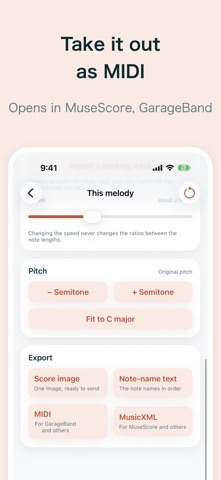
The melody you hum becomes sheet music, just as you hummed it. You do not have to change how you sing. Hum straight through without breaking it up, as quietly as you like. Wavering and second tries are taken as they come. Leave the melody that came to you before it slips away. You do not need to play an instrument, and you do not need to know how to write music. - What it does - - Records only while you hold the big button (up to 60 seconds per take) - Shows a staff in well under a second after you let go - Puts a piano roll underneath, so you can see the note lengths - Plays the melody back on a piano. You can also play from a chosen note, loop, and let the view follow along - Light and dark appearance - The score is yours to fix, right there - Our reading is not perfect. That is why there are exactly four ways to fix it. - Split - a run held at one pitch becomes a single long note. Tap it, press Split, and it comes apart - Merge - when the tail of a fading voice is left behind as a short note, add it to the note before - Sharp and flat - move one note a semitone at a time - Longer and shorter - change a note value one step at a time Undo and redo move you back and forth. There is also transposition for the whole melody, and Fit to C major. Deeper tools, such as selecting a range to fix at once or zooming the roll, are kept under "Details". - We do not overclaim - - Notes we were unsure of are drawn faintly. It is a "worth a look" mark, not a claim that they are wrong - The tempo is written as a rough guide. The speed slider changes it, and moving it never changes the note lengths - The key is not guessed at all. It is simply written in C major - Nothing leaves the device - The voice you record and the score it becomes stay on this device. Turning sound into notes also finishes on the device, so it works with no internet connection. - Export - The score image and the note-name text can be shared for free, always. MIDI and MusicXML come with Pro, and open in MuseScore, Flat, GarageBand and the like. - What Pro adds - - MIDI and MusicXML export - Unlimited saves (free keeps up to 20) - Five playback instruments (free plays piano) - Vibrato on playback - Load a backing track and play the melody along with it - AUv3: insert it as a MIDI FX in Logic Pro or GarageBand, and a saved melody plays out as MIDI in time with the host - What it costs - A one-time purchase. There is no subscription, and there are no ads. Even on the free app, turning humming into notes is unlimited. Saving stops at 20, but past 20 nothing you saved is removed, and all of it stays readable, playable and editable. Consider Pro only if you want to save more. - Requirements - iPhone and iPad, iOS 17.0 or later. Japanese and English.
What's new · 1.2.0
Thank you for using the app. Repeating a melody no longer leaves a gap where it goes back to the start, and a backing track no longer drifts further out of time on every pass. Vibrato is now the wobble you actually sang, rather than a fixed one added afterwards (Pro). It applies to melodies you record from now on. A quiet room is much less likely to turn into notes on its own. Settings has a new Sensitivity slider if you want to take that further. There is a count-in before recording. Anything you hum while it counts is kept as notes. Turn on "Keep the original voice" in Settings and the app keeps the recording itself (Pro), to listen back to or to send. If anything catches your eye, please tell us through the contact form inside the app. What you send us shapes the next improvement.
Details