

Better Gif Bar: GIFs for Texts
Richard Wellington · Utilities
Independent analytics for this App Store listing. AppTracker is not affiliated with Richard Wellington.
Chart standing · US
What changed · US
Listing changes AppTracker has observed for this app in this storefront — new versions, price moves, rating shifts, and store copy.
• Pin a caption to a face, a pet — anything in the GIF — and it follows along. Select the text, tap Pin, tap what it should follow. Captions stay put unless you pin them. Everything runs on your phone; nothing is uploaded. • A pinned caption can do more than follow: a Follow slider sets how closely the text tracks its subject, Hide / Show keeps it attached but out of sight for part of its time, and Release lets go at that moment and sends the text flying — drag the handle on the GIF to aim it, pick Straight, Arc, or Drop, and Fade if you like. Nothing new appears until a caption is pinned. • Pins are free for a week from your first pinned send, then one every two weeks. Pro makes pins unlimited and removes the corner mark, forever. One purchase, no subscription. Captions with timing stay free. • A small, one-time note asks for a rating after your fifth send. • A quiet line under the search field, while results are showing, says how to caption: press and hold any GIF to add and time your own captions. • The companion app links the Mac app and states plainly: we never see what you type or send. • Fix: the drawer no longer collapses while you're typing a search.
Screenshots



About
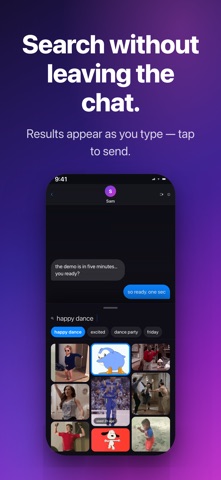
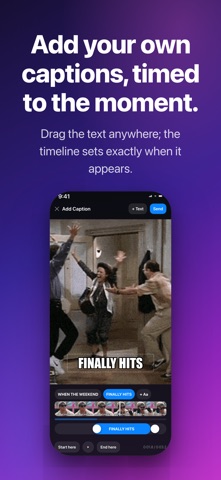
BetterGifBar lives in the Messages app drawer — search, send, and caption GIFs without ever leaving your conversation. SEARCH WITHOUT LEAVING THE CHAT • Tap the drawer, search KLIPY's library, tap to send — the GIF drops straight into your reply • Recents and trending are already there when you open it, zero waiting MAKE IT YOURS — CAPTIONS • Add your own text to any GIF: classic meme lettering you drag anywhere, sized how you like • Stack as many lines as the joke needs — every caption gets its own timing on one shared timeline • Scrub to the exact frame and set when each line appears and disappears • Captioned GIFs render on your device and save to your recents for reuse YOURS • No accounts, no sign-in • Free FREE TO USE Search, sends, and captions with timing are free — no purchase, no subscription. Pinned captions (text that follows a face, a pet) are free for a week, then one every two weeks; Pro, a one-time purchase, makes pins unlimited and removes the small corner mark.
What's new · 1.1
• Pin a caption to a face, a pet — anything in the GIF — and it follows along. Select the text, tap Pin, tap what it should follow. Captions stay put unless you pin them. Everything runs on your phone; nothing is uploaded. • A pinned caption can do more than follow: a Follow slider sets how closely the text tracks its subject, Hide / Show keeps it attached but out of sight for part of its time, and Release lets go at that moment and sends the text flying — drag the handle on the GIF to aim it, pick Straight, Arc, or Drop, and Fade if you like. Nothing new appears until a caption is pinned. • Pins are free for a week from your first pinned send, then one every two weeks. Pro makes pins unlimited and removes the corner mark, forever. One purchase, no subscription. Captions with timing stay free. • A small, one-time note asks for a rating after your fifth send. • A quiet line under the search field, while results are showing, says how to caption: press and hold any GIF to add and time your own captions. • The companion app links the Mac app and states plainly: we never see what you type or send. • Fix: the drawer no longer collapses while you're typing a search.
Details