

Saffron SPICE
Upcastr Pty Ltd · Utilities
Independent analytics for this App Store listing. AppTracker is not affiliated with Upcastr Pty Ltd.
Chart standing · US
What changed · US
Listing changes AppTracker has observed for this app in this storefront — new versions, price moves, rating shifts, and store copy.
Clipboard sync. Tap the new clipboard button to send whatever you copied on your phone to the remote machine, text or image. Anything copied on the remote machine lands on your phone automatically; switch that off in Settings or per connection. The toolbar now sits just under the Dynamic Island and the desktop starts below it, so nothing hides behind the buttons when you pan.
In-app purchases · US
No in-app purchases.
Screenshots


Similar apps
Competitors and close alternatives, as estimated by AppTracker.


About
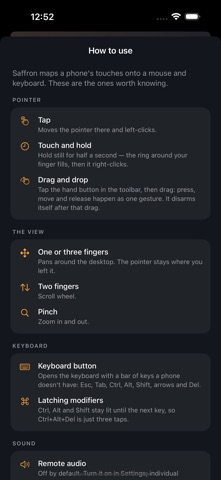
Saffron is a fast, native SPICE client for your virtual machines. Connect to Proxmox, QEMU/KVM, libvirt, or oVirt hosts and control your VMs with a touch experience actually designed for a phone. TOUCH CONTROLS THAT MAKE SENSE • Tap to left-click, exactly where you touch • Press and hold for right-click — a ring fills around your finger so you always know when it fires • One-finger drag pans the screen, pinch to zoom, two fingers to scroll • A dedicated drag mode for moving windows and selecting text A REAL KEYBOARD, DONE RIGHT • Full on-screen typing with a modifier bar above the keyboard • Ctrl, Alt and Shift latch for shortcuts like Ctrl+C • Esc, Tab, arrows and Delete one tap away BUILT FOR SPEED • Native Metal rendering — smooth, sharp, and battery-friendly • Instant reconnects and saved connections with passwords stored securely in the iOS Keychain • Works with SPICE servers from Proxmox VE, QEMU, libvirt, virt-manager and oVirt Saffron talks the SPICE protocol directly — no middleman services, no accounts, no tracking. Your connection goes straight from your phone to your server.
What's new · 1.1.0
Clipboard sync. Tap the new clipboard button to send whatever you copied on your phone to the remote machine, text or image. Anything copied on the remote machine lands on your phone automatically; switch that off in Settings or per connection. The toolbar now sits just under the Dynamic Island and the desktop starts below it, so nothing hides behind the buttons when you pan.
Details