

Fotik: Clean Up Photos
Anastassiya Shugaley · Utilities
Independent analytics for this App Store listing. AppTracker is not affiliated with Anastassiya Shugaley.
Chart standing · US
What changed · US
Listing changes AppTracker has observed for this app in this storefront — new versions, price moves, rating shifts, and store copy.
• Faster on big libraries: the home screen responds instantly, even while scanning. • Smoother opening and closing of “On this day” and other sorting sessions. • Pro button on the home screen — plans and price are always one tap away. • Photo previews load instantly and stay sharp while you scroll. • Tap the heart while sorting to save a photo to Favorites. • Your last scan shows up at once; new photos are added in the background.
Screenshots


About
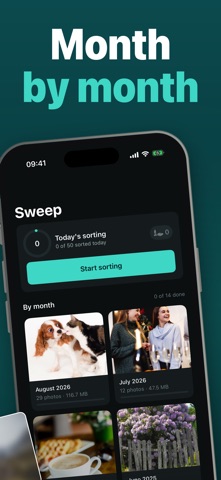
Your gallery fills up quietly. Duplicates, similar shots, screenshots, screen recordings, blurry photos and oversized videos pile up without you noticing — until your phone refuses to save one more photo. Fotik scans your library right on the device and shows you exactly what is taking up space. WHAT WE FIND • Duplicates and similar shots — with a suggestion of which one to keep • Screenshots and screen recordings • Blurry and shaky photos • Large videos and large photos • Live Photos, bursts and photos older than a year SWEEP WITH YOUR THUMB Go through photos like a deck of cards: swipe left to delete, right to keep, up to send a photo straight to your Favorites. MONTH BY MONTH Browse your library one month at a time, see how much of each month is already sorted, and jump to "On This Day" to revisit photos from years past. DAILY GOAL AND STREAK Set a daily goal for how many photos to sort, and keep a streak going day after day. MONTHLY RECAP At the end of each month, Fotik puts together a recap of what you cleared — ready to share. EVENING REMINDER A gentle local reminder nudges you to sort a few more photos before the day ends. Turn it on or off anytime. WHERE DELETED PHOTOS GO iOS moves anything you delete to "Recently Deleted" first, where it stays recoverable for 30 days and still takes up space before it's gone for good. Fotik says so plainly instead of promising space that only appears later. PRIVACY Your photos are analyzed on the device only. Nothing is uploaded to any server. The app contains no ads. FOTIK PRO Scanning your library, browsing swipe by swipe, and seeing exactly what takes up space works for everyone. Removing what you don't want asks for Fotik Pro, an auto-renewing subscription. SUBSCRIPTIONS AND TERMS Fotik Pro is offered as an auto-renewing subscription, with a one-time lifetime option also available. Payment is charged to your Apple Account when you confirm the purchase. A subscription renews automatically unless cancelled at least 24 hours before the end of the current period; the charge occurs within 24 hours before that period ends. Manage or cancel anytime in Settings → your name → Subscriptions. Terms of Use (EULA): https://www.apple.com/legal/internet-services/itunes/dev/stdeula/ Subscription terms: https://jjjulietttee-jpg.github.io/fotik-app/terms.html Privacy Policy: https://jjjulietttee-jpg.github.io/fotik-app/privacy.html
What's new · 1.5
• Faster on big libraries: the home screen responds instantly, even while scanning. • Smoother opening and closing of “On this day” and other sorting sessions. • Pro button on the home screen — plans and price are always one tap away. • Photo previews load instantly and stay sharp while you scroll. • Tap the heart while sorting to save a photo to Favorites. • Your last scan shows up at once; new photos are added in the background.
Details