

PixelCraft: Pixel Art Color
Nicolas Zanette · Games
Independent analytics for this App Store listing. AppTracker is not affiliated with Nicolas Zanette.
Chart standing · US
What changed · US
Listing changes AppTracker has observed for this app in this storefront — new versions, price moves, rating shifts, and store copy.
• New “Fantasy” theme: 18 pictures, from the magic wand to the dragon. • Halloween pack: 6 new pictures and a collection to complete. • A reserved picture can now be unlocked by watching an ad, without spending coins. • The daily gift is easier to spot and shows what tomorrow brings.
Screenshots



About
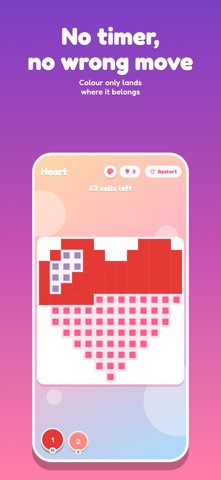
Rest your thumb, a square fills with color. Then another. A few minutes later a picture appears, and the day weighs a little less. PixelCraft is a pixel art color by number game built to be calm: no timer, no penalty, no right way to do it. You color at your own pace, for as long as you like, and you stop whenever you feel like it. EVERYTHING WORKS OFFLINE On the subway, on a plane, out in the country: PixelCraft never needs a network to be played. No account to create, no profile: your progress, your coins and your settings stay on your device. The app is fully in English. 168 PICTURES, 9 THEMES Animals, Fruit, Food, Nature, Space, Objects, Symbols, Holidays and Fantasy. Four difficulty levels, from a gentle 16x16 to a more ambitious 32x32, so you can choose between a five minute break and a real session. YOUR PHOTO AS PIXEL ART Pick a photo from your camera roll: PixelCraft turns it into a picture to color, from 16x16 up to 32x32. Everything is computed on your device — the photo is never sent anywhere. ONE SIMPLE GESTURE Tap a square, or slide your finger to fill several at once. Pinch to zoom in on the details. Made a mistake? It does not count: the color only lands where it belongs. WATCH YOUR PICTURE COME TO LIFE Every finished picture keeps its timelapse: replay the creation square by square, then share the final image with whoever you like. A GENTLE HABIT - A picture of the day, different every morning - A streak of consecutive days that keeps growing - A login gift on a seven day cycle - Thirteen trophies and your coloring statistics - Themed collections to complete COINS AND A SHOP Coloring earns coins. They unlock the reserved pictures, turn your photos into pictures to color, buy hints and boosters — or simply pile up until you want something. Everything is earned by playing. PLAY AGAIN IN FREE MODE A finished picture reopens in free mode: the colors are yours, with no numbers, and five palette moods including Pastel, Neon, Sepia and Night. The same animal in neon or in sepia is no longer the same picture. COLORS EVERYONE CAN TELL APART A setting gives every color its own pattern, on the palette and on the grid. Two close shades stop looking alike, whatever your color vision. COMFORT Light or dark theme, background music you can mute, a daily reminder if you want to be nudged toward your break. Anonymous usage statistics, which serve to fix what breaks, can also be turned off with one tap in the settings. PixelCraft asks nothing of you: no sign up, no login, no constant attention. Open it, color, close it.
What's new · 1.3.0
• New “Fantasy” theme: 18 pictures, from the magic wand to the dragon. • Halloween pack: 6 new pictures and a collection to complete. • A reserved picture can now be unlocked by watching an ad, without spending coins. • The daily gift is easier to spot and shows what tomorrow brings.
Details